
Month-end close: how to close the books step by step
The month-end close step by step: reconcile accounts, record accruals and prepaid expenses, review the trial balance and prepare financial statements.
Free app. Runs on your Mac with the Claude or Codex plan you already have.
What the month-end close is
The month-end close is the work of checking, completing and locking a month's accounting records so that the financial statements for that month can be trusted. It brings each balance sheet account into agreement with outside evidence, records the costs and income that belong to the month, and ends with a trial balance that someone other than the preparer has reviewed. Until the close is done, the month's numbers are provisional: a bill entered late or a payment matched to the wrong invoice can still change the result.
A good close follows the same month-end close checklist every month, in the same order, with a preparer and a reviewer for each task. The method below is how a controller or an experienced bookkeeper runs it. Each step says what to do and why, then how 10folds carries it out. Small companies often skip the close and catch up at year end; the cost is a year of decisions made on numbers nobody had checked.
What it does for the business
- Numbers you can decide onManagement reports are only as good as the close behind them. A complete close means the margin, cash and costs you look at reflect the month that happened. A cost recorded in the wrong month can make a good month look bad and hide a real problem in the next.
- Problems found while they are smallA missing receipt or a short payment is easy to sort out in the month it happens. Six months later it means searching through old emails. The people involved still remember the details, and the documents are still easy to find.
- Faster year end and auditsWhen every month is reconciled and documented, the year-end close and any audit start from clean balances with a trail to follow. Auditors and tax advisers have fewer questions to ask, and any question about a figure can be answered from the month's file.
- A predictable routineA fixed checklist means the close takes about the same time each month and does not depend on one person's memory. New team members can follow the checklist and see what done looks like.
Month-end close, step by step
Collect the month's records
You cannot close a month while its documents are still in someone's inbox.
What to do
- Set a close calendar: the date each task is due and who does it.
- Make sure every sale is invoiced and every supplier bill for the month is entered.
- Collect receipts for card spending and get the payroll report.
- Set a cutoff: anything that arrives after it waits for next month or goes in as an accrual.
- Check that last month's closing balances still agree with this month's opening balances.
Why
Most close delays come from missing inputs, and few come from hard accounting. A fixed cutoff stops the close from waiting on the last document. A written calendar also shows who is waiting on whom, which is where most of the time goes.
Reconcile the bank and the key accounts
Every balance on the balance sheet should agree with something outside the ledger.
What to do
- Match every bank and card line to its invoice, bill or receipt.
- Reconcile receivables and payables to their detailed lists of open items.
- Agree payroll, sales tax and loan balances to their reports and statements.
- List each difference with its likely cause and the action that would clear it.
- Keep each reconciliation with its date, its preparer and the evidence used.
Why
Account reconciliation is the core of the close. An unexplained difference is either an error or a missing entry, and both change the month's results. The bank comes first because it is the one balance confirmed by an outside party every day, and many other accounts depend on it.
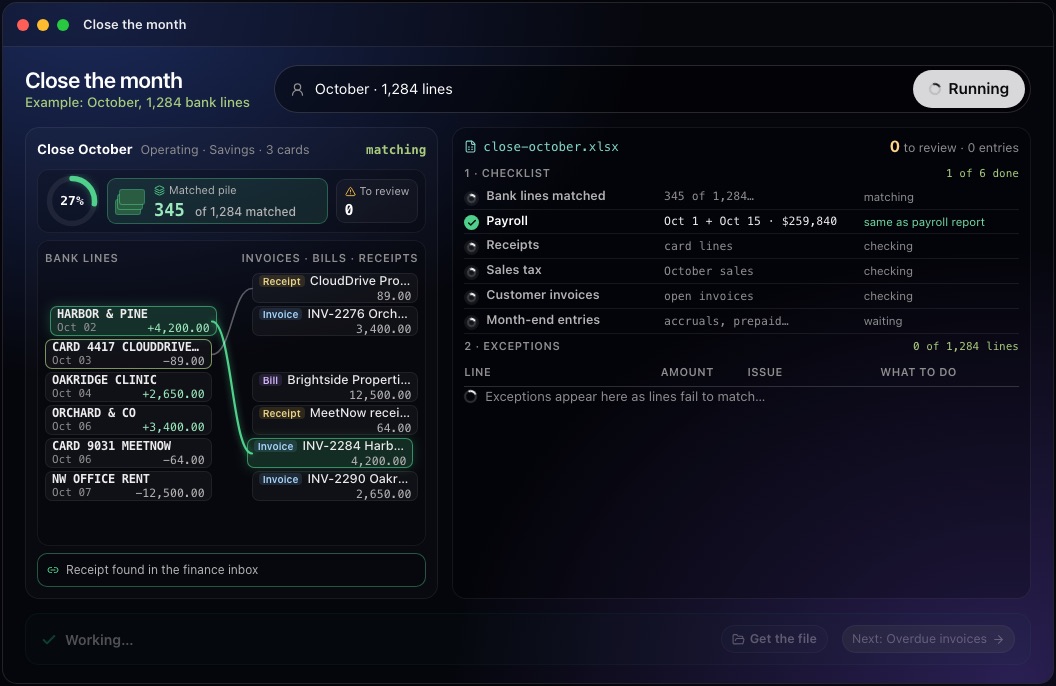
This step in the 10folds window. Example data from the animation on the home page. Chase the exceptions
An unmatched line is a question with a person attached to it.
What to do
- Short payments: confirm with the customer and leave the balance open.
- Deposits with no invoice: find out who paid and for what.
- Card spending with no receipt: ask the cardholder.
- Possible duplicates, and transfers with one side missing: check before entering anything.
Why
Exceptions are where errors hide. Forcing them to match by writing off small differences buries real problems, such as a double charge or a customer who still owes money. Give each exception an owner and a date, and carry the unresolved ones into next month's list so they are not forgotten.
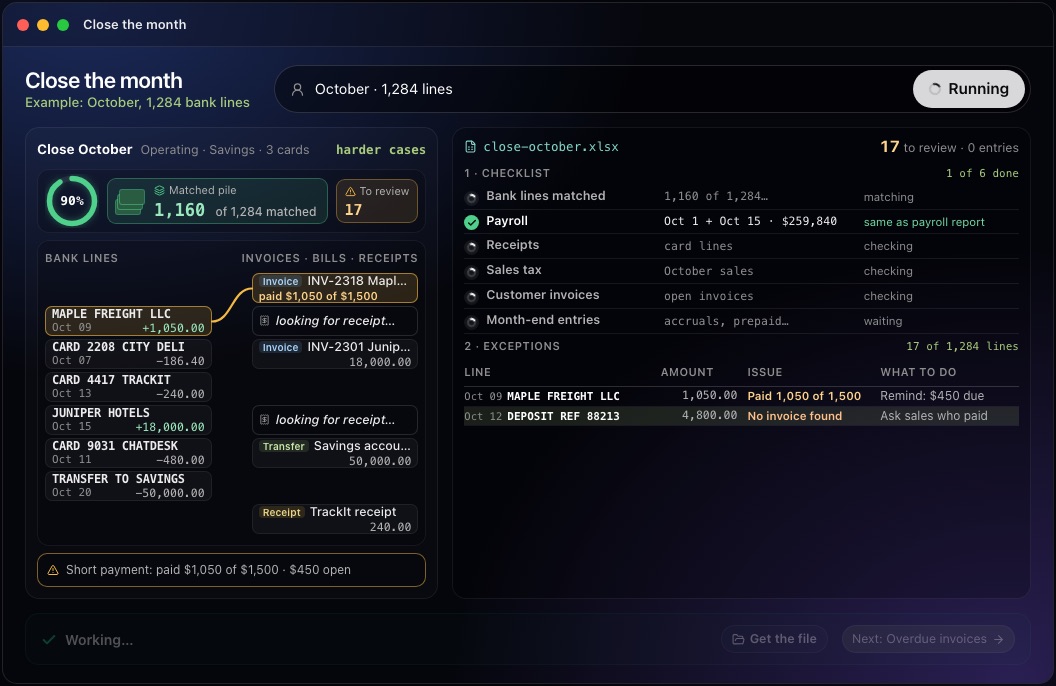
This step in the 10folds window. Example data from the animation on the home page. Record accruals, prepaids and other adjusting entries
A cost belongs to the month it was incurred, whenever the bill arrives.
What to do
- Accruals: record costs incurred this month whose bill has not arrived, such as contractor hours.
- Prepaid expenses: spread annual payments, such as insurance, over the months they cover.
- Record depreciation on equipment, and deferred revenue for income received in advance.
- Write each journal entry with its calculation and supporting document attached.
Why
Without adjusting entries, a month with a large annual payment looks terrible and the next eleven look too good. Accruals and deferrals put income and costs in the right month, so months can be compared. Keep a schedule for each prepaid and deferred item, showing the amount left to spread, so the balance sheet can be checked against it.
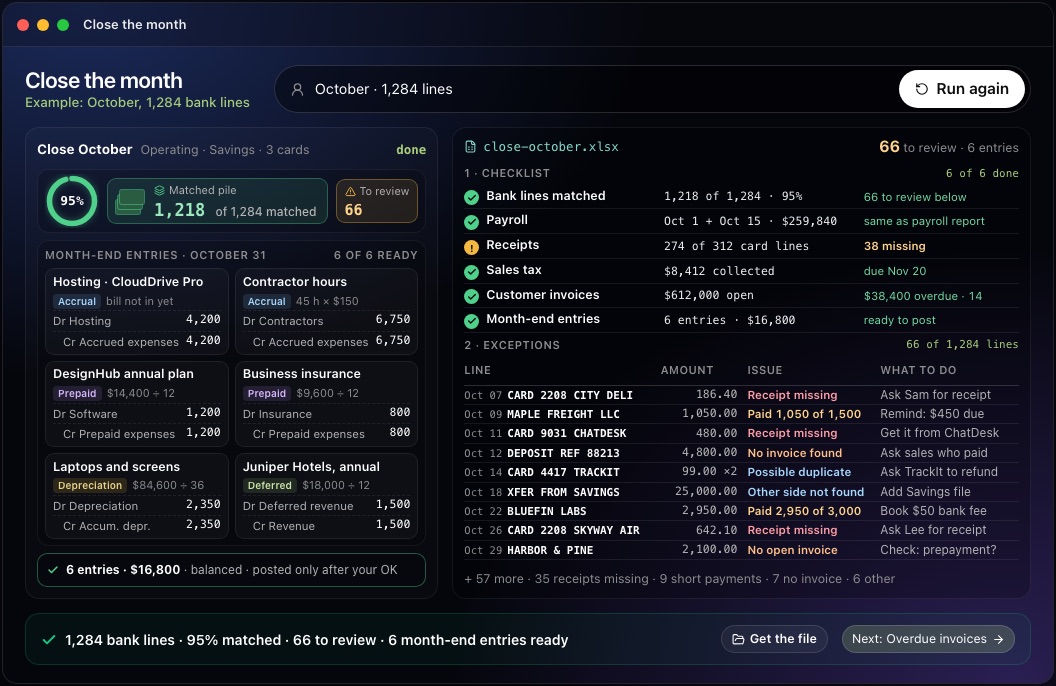
This step in the 10folds window. Example data from the animation on the home page. Review and lock the month
A close is finished when a second person has read it.
What to do
- Run the trial balance and check that debits equal credits.
- Compare each account with last month and with the budget, and explain large movements.
- Have a reviewer check the reconciliations and journal entries before approval.
- Prepare the financial statements, then lock the period in your accounting software.
- Note what slowed the close, so you can fix it before next month.
Why
A reviewer catches what preparers cannot see in their own work. Locking the period stops later edits from quietly changing numbers that have already been reported. Comparing with last month is the quickest way to catch an entry posted to the wrong account, because it shows up as an unusual movement. Note any open exceptions on the final report, so readers know which figures may still move.
Common mistakes
- No cutoffThe close waits for the last document and never finishes on time.
- Plugging small differencesA difference written off as rounding is often a duplicate or a missing payment.
- Skipping accrualsMonthly results then swing with the timing of bills.
- Approving your own entriesErrors pass when nobody else reads them.
- Leaving the period openLater edits change numbers that have already been reported.
What a good result looks like
- Every bank and card account reconciled, with differences listed and explained.
- A list of exceptions, each with an owner and the action that clears it.
- Adjusting entries with their calculation and evidence.
- A reviewed trial balance and a comparison with last month.
- The checklist marked done, showing who prepared and who reviewed each task.
And then what? Using the result
- Review and approve the proposed entries, then post them in your accounting software.
- Send each exception to the person who can clear it.
- Chase the short payments and the deposits with no invoice.
- Lock the period once the financial statements are approved.
- Fix whatever slowed the close before next month.
When to run it
- In the first days of each monthClosing promptly means the numbers are still recent enough to act on. The longer the close takes, the less useful the numbers become.
- Before a board meeting or a bank reviewClosed, reviewed numbers are what a board pack or a lender's request should rest on. Close first, then build the report from the closed numbers.
- When the books have fallen behindClosing month by month, oldest first, is the way to catch up without carrying errors forward. Each closed month makes the next one easier, because its opening balances are confirmed.
- After a change of accountant or softwareA full close on the first month in the new setup confirms that balances moved across correctly and that nothing was lost.
Questions people ask
What is the month-end close process?
It is the monthly routine of collecting records, reconciling accounts, recording adjusting entries and reviewing the results, so that the month's financial statements are complete and correct. It ends when a reviewer has approved the results and the period is locked.
What are the steps of a month-end close?
Collect the records, reconcile the bank and key balance sheet accounts, clear the exceptions, record accruals and other adjusting entries, then review the trial balance, prepare the financial statements and lock the period. The order matters: entries made before the bank is reconciled often have to be redone.
How long should a month-end close take?
It depends on the size and complexity of the business. A small company with clean records can often close in a few working days; a fixed checklist and cutoff matter more than any target. Most of the time saved comes from fewer missing documents, rather than from faster accounting.
Who reviews the month-end close?
Someone other than the preparer: a controller, a finance lead or an outside accountant. They check the reconciliations and journal entries before the period is locked. In a very small business, a monthly review by an outside accountant is a common arrangement.
How is the month-end close different from a bank reconciliation?
A bank reconciliation is one task inside the close. The close also covers receivables, payables, payroll, tax, adjusting entries and the final review. It is usually the first task, because other reconciliations rely on the cash figures.
Does the 10folds job post entries to my books?
No. The job prepares the month-end entries for a person to review. Nothing is posted to your books unless you post it yourself. Approved entries are yours to post in your accounting software.
More jobs in Finance
Close the month, on your own Mac.Free app. Runs on your Mac with the Claude or Codex plan you already have. Your files stay on your computer.
Download for Mac