
Log analysis for intrusion detection: from raw events to incidents
Log analysis for intrusion detection step by step: gather sign-in, server and cloud logs, learn what is normal, link anomalies and rebuild each incident.
Free app. Runs on your Mac with the Claude or Codex plan you already have.
What log analysis for intrusion detection is
Log analysis for intrusion detection is the work of reading the records your systems already keep (sign-ins, servers, cloud activity, email) to find signs that someone got in or is trying to. Done well, it produces a few incidents, each rebuilt step by step with what to do now. Done badly, it produces thousands of alerts, and the one that mattered is lost among them. Most organizations already keep the logs they need; what is missing is the time and method to read them together.
The method below is how a security analyst works through logs. Analyze only logs from systems you own or are authorized to monitor, and handle the personal data in them with care. The boxes show how 10folds does each step. Treat its result as a draft for the person who responds to incidents.
What it does for the business
- Catch a compromise while it is smallAn attacker can sign in, create a key and move data within an hour. Connecting those events early limits what leaves the company. Early detection also keeps the cleanup small: fewer accounts to reset and less data to assess.
- Spend attention on real incidentsGrouping anomalies into incidents and explaining the false alarms cuts the noise. The team reads three stories instead of three thousand alerts. Each explanation is kept, so the same noise does not come back the next day.
- Act on the real entry pointA rebuilt timeline shows which account, key and address to revoke or block, so the fix covers everything the attacker touched. It also gives you a clear record if you later need to explain what happened to customers or authorities.
- Find the gaps in your defensesIncidents reveal missing controls, such as accounts without multi-factor authentication. Each one becomes a concrete improvement. Even blocked attacks are worth reading for this reason.
Log analysis for intrusion detection, step by step
Collect the right logs
You cannot detect what you do not record.
What to do
- Gather sign-in logs from your identity provider, server and application logs, cloud audit logs and email logs.
- Set the window: the last 24 hours for a daily review, longer for an investigation.
- Convert timestamps to one time zone and check that system clocks agree.
- List missing sources. A gap is a finding in itself.
- Work from read-only copies and never change the systems you are analyzing.
Why
Attacks cross systems: a stolen sign-in leads to a cloud key, then to a data export. Without every source, the chain breaks. A SIEM (security information and event management system) gathers these logs in one place, but the same work can start from exports. Check retention too. If sign-in logs are kept for only a week, an intrusion found later cannot be traced back to its start.
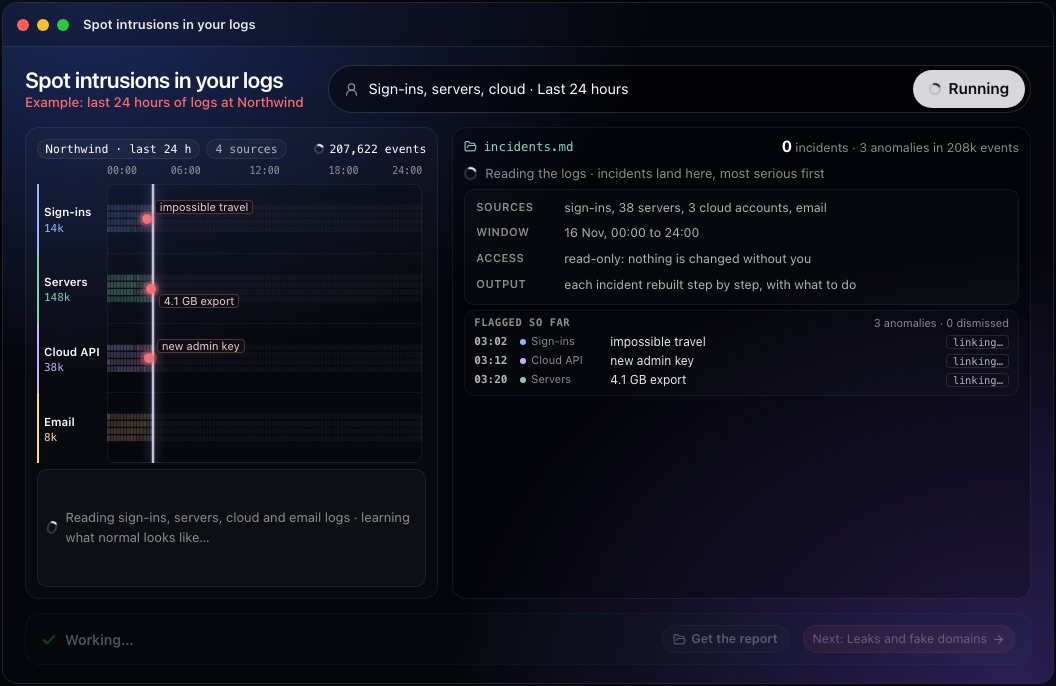
This step in the 10folds window. Example data from the animation on the home page. Learn what is normal and flag anomalies
An event is suspicious only against a baseline.
What to do
- Build a baseline for each account and system: usual countries, devices, working hours, data volumes and admin actions.
- Flag departures: impossible travel (sign-ins from two places too far apart for the time between them), a first-ever admin key, an unusually large export, a new mail forwarding rule.
- Flag known attack patterns: password spraying (a few guesses against many accounts), repeated SSH attempts, a stream of multi-factor push requests until someone approves.
- Check addresses and files against indicators of compromise, the published traces of known attacks.
- Write down each anomaly with its time, source and the account or address involved.
Why
Fixed thresholds miss quiet attacks and fire on busy days. A baseline per account catches the small, unusual action that generic rules overlook. Baselines need a few weeks of history to be reliable, so expect more false alarms at first and adjust as you go.
Link anomalies into incidents
Attackers leave a trail across systems; follow the account and the address.
What to do
- Group anomalies that share an account, an IP address, a key or a device within a short time window.
- Put each group in order as an incident timeline.
- Check the harmless explanations: deployments, approved travel, scheduled jobs, test environments.
- Dismiss explained anomalies and write the reason down.
- Note the first and last event of each incident, which bound the period to investigate.
Why
Event correlation is where log analysis becomes detection. A sign-in from abroad is weak evidence on its own; the same account creating an admin key and exporting a database minutes later is strong evidence. Writing down why an anomaly was dismissed prevents alert fatigue from repeating the same check tomorrow. Order matters as much as content: a large export before a suspicious sign-in tells a different story from one after it.
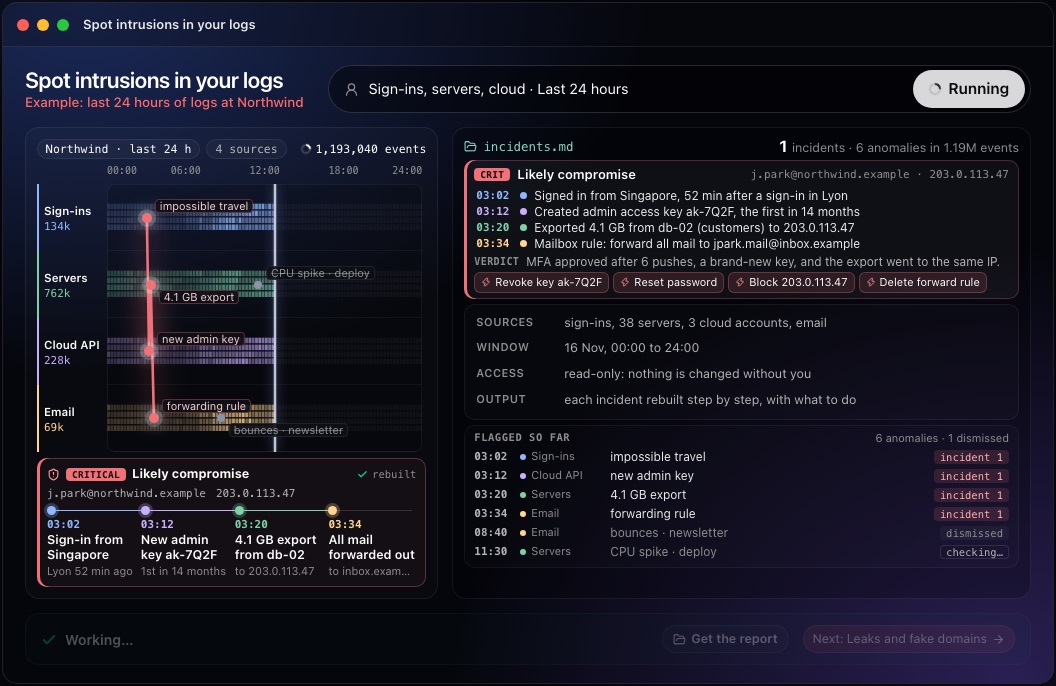
This step in the 10folds window. Example data from the animation on the home page. Rebuild each incident and act
Evidence first, then conclusions, then actions.
What to do
- Write each incident step by step: time, system, account, action, address.
- Give a verdict and a severity: likely compromise, blocked attempt or false alarm.
- List the immediate actions: revoke keys, reset passwords, block addresses, remove mail rules, require multi-factor authentication.
- Preserve the relevant logs before they are rotated away.
- Escalate a likely compromise to whoever leads incident response and, where required, to legal counsel.
Why
Responders need to know exactly what to undo. A timeline shows the entry point and every change made after it, so nothing is left behind. Some incidents carry notification duties, which is why a qualified person makes the final call. Keep the timeline factual, limited to what the logs show, and mark any guess as a guess.
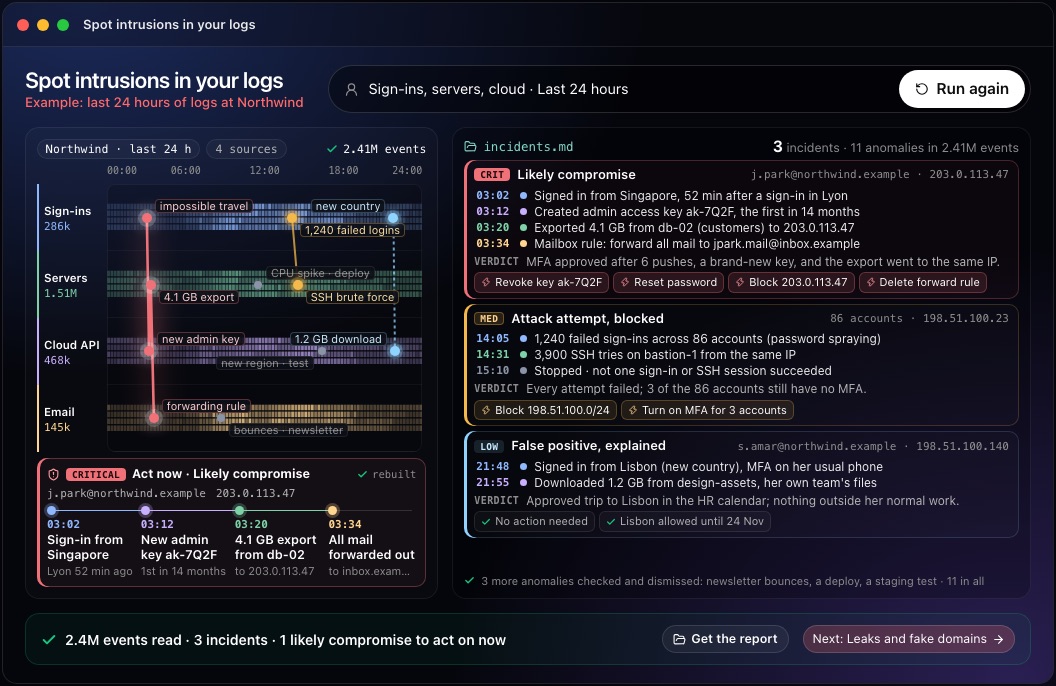
This step in the 10folds window. Example data from the animation on the home page. Close the gaps and tune detection
Every incident should leave your defenses a little stronger.
What to do
- List the controls that would have stopped or caught each incident sooner, such as multi-factor authentication or an alert on new admin keys.
- Turn each confirmed attack pattern into a detection rule for the next review.
- Add each explained false alarm to an allow list with an expiry date.
- Add missing log sources, and keep logs longer where an investigation ran out of history.
- Share what was learned with the people who own the affected systems.
Why
Reviewing logs finds incidents; learning from them prevents the next one. Allow lists with expiry dates reduce noise without hiding a pattern forever, and each new rule makes the next daily review faster. Over time, this is what turns a daily log review from a hunt into a short check of known patterns plus anything new.
Common mistakes
- Collecting everything, reading nothingVolume without priorities buries the signal.
- Judging events one by oneEach step of an attack can look harmless on its own. Read them as a sequence, by account and by address.
- Dismissing without a reasonThe same anomaly gets investigated again tomorrow.
- Acting before preserving evidenceLogs rotate, and some fixes erase the traces you need later. Copy the relevant logs first, then act.
- Ignoring failed attacksA blocked spraying run still shows which accounts lack multi-factor authentication.
What a good result looks like
- The sources read, the window covered and the gaps.
- Incidents ranked by severity, each with a step-by-step timeline.
- A verdict and the evidence behind it.
- Concrete actions naming the exact account, key or address.
- Dismissed anomalies listed with their explanation.
And then what? Using the result
- Carry out the actions for any likely compromise now.
- Fix the gaps the incidents revealed, such as accounts without multi-factor authentication.
- Add missing log sources and keep logs longer where needed.
- Turn each confirmed pattern into a detection rule.
- Review the logs daily so the window stays short.
When to run it
- As a daily reviewA short daily window keeps the time between an intrusion and the response small. It also builds the baseline that makes each later review sharper.
- After an alert or a strange reportWhen a user reports an odd sign-in or a customer receives a suspicious email, the logs show what happened. Start from the reported account or address and work outward.
- When you have logs but no security teamA structured review turns stored logs into decisions. It gives a small team a routine it can keep up.
- Before and after a major changeNew systems and permissions change what normal looks like. Review the logs closely in the days after a migration, a new identity provider or a change of permissions, when attackers and mistakes are both more likely.
Questions people ask
How do you detect intrusions in logs?
Collect sign-in, server, cloud and email logs, learn the normal pattern for each account and system, flag departures, and link them by account, address and time into incidents. Then rebuild each incident and act on it. A SIEM can automate the linking once the rules are known.
Which logs should you monitor for security?
Start with identity provider sign-ins, cloud audit logs, server authentication logs and email rule changes. Add application and network logs as you can. These cover most of the ways attackers get in and what they do first.
What is impossible travel?
It is when one account signs in from two places too far apart to reach in the time between the sign-ins. It often means a stolen password or session, though VPNs cause false alarms. Check it against known travel, VPN use and the device before acting.
What is the difference between an anomaly and an incident?
An anomaly is one unusual event. An incident is a set of related events that together show an attack or a compromise. Most anomalies have a harmless explanation, which is why linking them matters.
Do I need a SIEM for log analysis for intrusion detection?
A SIEM helps at scale, but the method works on exported logs too. What matters is having the right sources and reading them together. Many small teams start with exports from their identity provider and cloud console.
Does log analysis replace an incident responder?
No. Log analysis finds and explains incidents; a person decides how to respond and whether anyone must be notified. The 10folds result is meant as a draft for whoever handles incidents, and the job is meant for logs from systems you own or are authorized to monitor.
More jobs in Cybersecurity
Spot intrusions in your logs, on your own Mac.Free app. Runs on your Mac with the Claude or Codex plan you already have. Your files stay on your computer.
Download for Mac