
Organic traffic drop: how to find the cause and fix it
How to diagnose an organic traffic drop: confirm it is real, find the pages and searches that lost clicks, test each likely cause, and fix the first ones.
Free app. Runs on your Mac with the Claude or Codex plan you already have.
What diagnosing a traffic drop means
An organic traffic drop is a fall in the visits a site gets from unpaid search results. Diagnosing it means working out exactly what changed: which pages and which searches lost clicks, from what date, and why. The cause can be on the site, such as a template change or a blocked section; in search, such as a core update or a new competitor page; or in the measurement itself, such as a tracking error.
The usual reaction is to guess, often blaming the latest algorithm update, and to start changing pages at random. A good diagnosis does the opposite. It confirms the drop is real, narrows the loss down to a few pages and searches, tests each possible cause against evidence, and only then names the first fixes. The method below is how an SEO specialist does it by hand. Each step says what to do and why, then how 10folds carries it out.
What it does for the business
- Stop the loss soonerEvery week a cause goes unfixed is another week of lost visitors and enquiries. A clear diagnosis lets you act on the right problem straight away.
- Avoid making it worseChanging pages at random after a drop can break what was still working. Knowing the cause keeps the fix narrow. It also protects pages that were never part of the problem from rewrites they did not need.
- Explain it to a client or a managerA diagnosis that shows which pages lost clicks, what changed and what was ruled out answers the first questions anyone will ask. Showing the causes that were ruled out is often what convinces people that the remaining one is right.
- Learn what to protect next timeIf a release caused the drop, the diagnosis tells the team which check to add before the next one goes live.
Organic traffic drop, step by step
Confirm the drop is real
Check the measuring tape before you measure the room.
What to do
- Compare analytics with Google Search Console. If only one fell, suspect a tracking error.
- Check whether the analytics tag, consent banner or filters changed around that date.
- Compare with the same weeks last year to rule out seasonality.
- Make sure the fall lasts more than a few days.
Why
A broken tracking tag or a new consent banner can make traffic look like it fell when visitors still arrive. Seasonal businesses dip every year at the same time. Both look like an SEO problem and are not one. A fall that lasts only two or three days may be normal variation or a reporting delay, so give it a week before treating it as a drop.
Compare before and after
A site-wide drop and a three-page drop have different causes.
What to do
- Compare the weeks after the drop with the weeks before, in Search Console.
- Find which pages lost the most clicks, by absolute number.
- Find which searches lost clicks or rankings, and by how many positions.
- Split by device and country to see whether the loss is general or specific.
Why
Most drops are concentrated. If a handful of pages carry most of the loss, the cause is usually something those pages share: a template, a section, a topic. If every page fell evenly, look at the whole site or at search itself. Working in absolute clicks keeps the focus on what matters: a page that went from 4 clicks to 1 lost 75%, but it is not the problem.
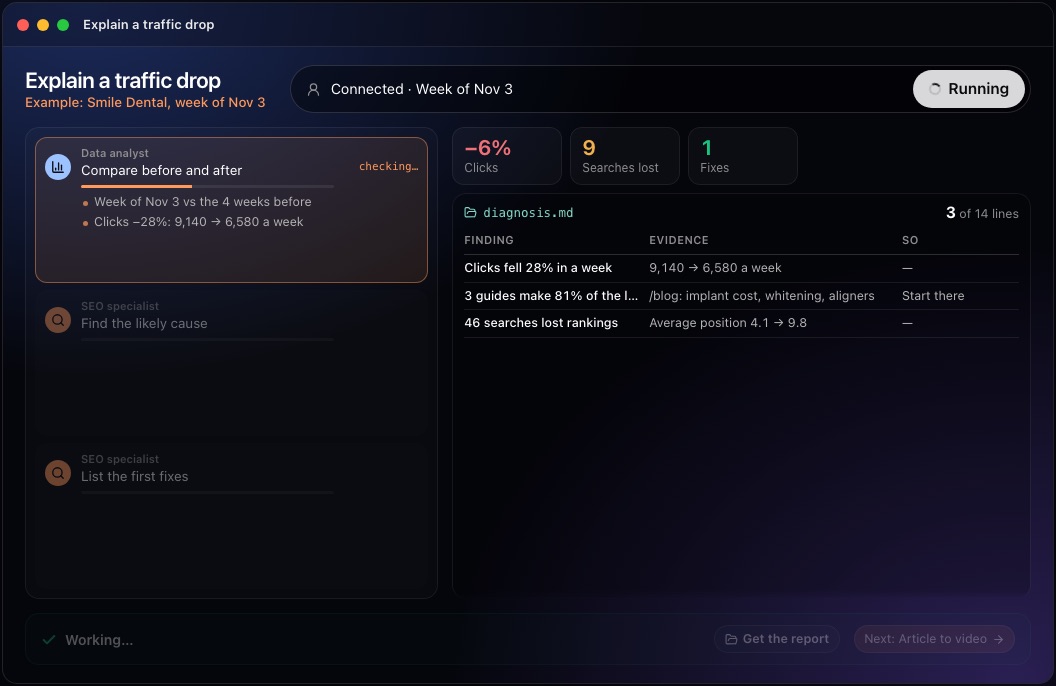
This step in the 10folds window. Example data from the animation on the home page. Check what changed on the site
Most drops start with a change someone made.
What to do
- List every release, template edit, URL change and redirect around the date.
- Check robots.txt, canonical tags and noindex directives on the pages that lost clicks.
- Check indexing: pages dropped from the index, or duplicate versions, such as print pages, indexed in their place.
- Check that the pages still load quickly and show the same content to search engines.
Why
A change made for a good reason, such as a new template or a cleaner URL structure, can quietly remove a tag or break a redirect. Because the change is dated, it can be matched precisely against the day clicks started to fall, which makes it the easiest kind of cause to prove.
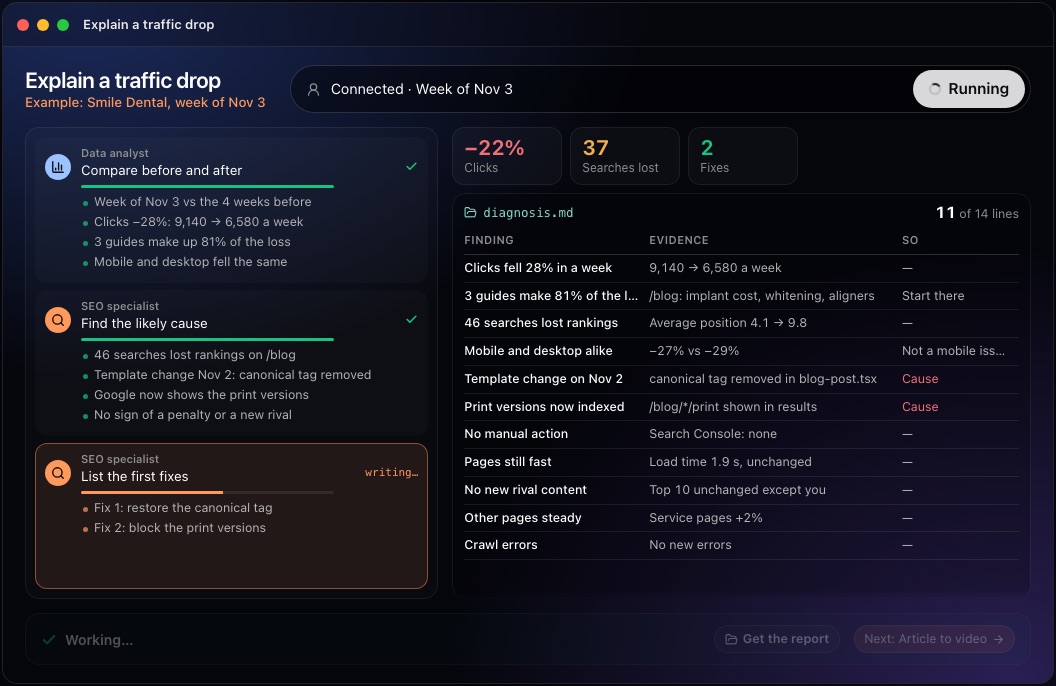
This step in the 10folds window. Example data from the animation on the home page. Check what changed in search
Write down what you ruled out. It is half the diagnosis.
What to do
- Look for a confirmed algorithm update or core update on or near the date.
- Search the lost queries and note which pages now rank above yours.
- Open the Manual actions and Security issues reports in Search Console.
- Check whether fewer people search the terms at all, and compare with last year for seasonality.
Why
Several causes look the same in a traffic chart. An update tends to move rankings across many pages and many sites at once; a new competitor page moves one search; falling demand lowers impressions while positions hold. Checking each one against evidence separates the real cause from a coincidence, and the ruled-out list stops the team chasing the wrong one.
List the first fixes, in order
Fix the cause, not the symptom.
What to do
- Write each fix with the page or template it applies to.
- Put first the fixes that address the most likely cause and the largest loss.
- Say when each should be done: today, this week, later.
- Ask search engines to recrawl the fixed pages once the fix is live.
Why
A clear order turns a diagnosis into action. Restoring a removed tag or unblocking a section can be done in minutes and should not wait behind slower content work. Saying when each fix should be done also tells the reader which fixes are certain and which depend on the cause being confirmed.
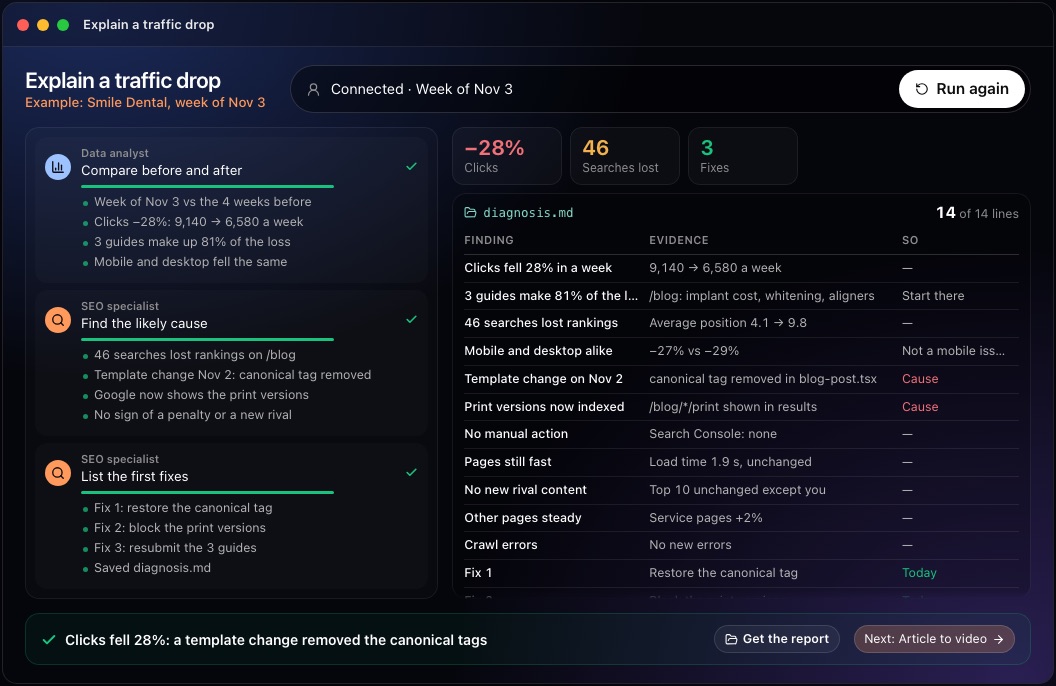
This step in the 10folds window. Example data from the animation on the home page. Watch whether clicks return
A fix is confirmed by the data that follows it.
What to do
- Note the date each fix went live.
- Track clicks and positions for the affected pages each week.
- If nothing improves after a few weeks, return to the list of causes.
- Add a check to your release process so the same fault cannot return unnoticed.
Why
Technical fixes often show results within days or weeks, once pages are recrawled. Losses from a core update can take months, because they usually call for better content, not a quick repair. Note the date of each fix, so a later rise or fall can be tied to it.
Common mistakes
- Blaming the latest algorithm updateCheck your own releases and indexing first. They are often the cause.
- Skipping the tracking checkA broken tag can look exactly like a traffic drop.
- Looking only at site totalsFind the pages and searches that carry the loss.
- Changing many things at onceYou will not know which change helped, or which made it worse.
- Ignoring seasonalityCompare with the same weeks last year before raising the alarm.
What a good result looks like
- One sentence: how much was lost, from when, and the likely cause.
- The pages and searches that carry most of the loss.
- Each finding with the evidence behind it.
- The causes ruled out, and why.
- The first fixes in order, with when to do each.
And then what? Using the result
- Apply the first fix today if it is a technical one.
- Ask for the fixed pages to be recrawled in Search Console.
- Tell the client or manager what happened, what was ruled out and what is being done.
- Check the affected pages' clicks every week until they recover.
- Add the fault to the checks your team runs before each release.
When to run it
- As soon as a drop is noticedThe closer you are to the date, the easier it is to match it with what changed.
- After a release or migrationIf traffic dips in the days after, a diagnosis tells you whether the release is the cause. Releases are dated, so the comparison is precise.
- When a client asks what happenedIt gives an evidence-based answer with first fixes, instead of a guess.
Questions people ask
Why did my organic traffic drop?
The common causes are a change on your site (a release, a template edit, new redirects or blocked pages), a Google algorithm update, a competitor's new page, a manual action, falling demand, seasonality, or a tracking error that only makes it look like a drop.
How do you diagnose an organic traffic drop?
Confirm it is real, compare the weeks before and after in Search Console to find the pages and searches that lost clicks, test each likely cause against the date, then list the first fixes in order.
How do I know if a Google update hit my site?
Check whether the drop started on the date of a confirmed update, whether rankings fell across many pages with no change on your side, and whether competitors' pages moved at the same time.
How long does it take to recover from a traffic drop?
It depends on the cause. A technical fault can recover within days or weeks once pages are recrawled. A drop from a core update can take months and usually needs better content. Falling demand or seasonality needs no fix at all, only patience and a fair comparison.
How do I check for a manual action?
Open Google Search Console and go to the Manual actions report under Security and manual actions. If there is one, it describes the issue and the pages affected.
What does the 10folds job need from me?
Google Search Console connected, and the date or week the traffic dropped. It returns diagnosis.md with the pages, the searches, the likely cause and the first fixes.
More jobs in SEO agencies
Explain a traffic drop, on your own Mac.Free app. Runs on your Mac with the Claude or Codex plan you already have. Your files stay on your computer.
Download for Mac