
Leaked credential monitoring and lookalike domains: a defender's method
Leaked credential monitoring step by step: check breach data for staff emails, rank each leak, find lookalike domains and decide what to reset or block.
Free app. Runs on your Mac with the Claude or Codex plan you already have.
What leaked credential monitoring is
Leaked credential monitoring is the work of checking whether your staff's work email addresses and passwords appear in a data breach or a dump of stolen logins, and deciding which accounts need action. It pairs naturally with watching for lookalike domains, the near-copies of your domain that criminals register to phish your staff and customers. Done well, it produces a short list: who must reset now, and which domains to take down or block. Both checks rely on public or licensed data and on records your organization controls.
The method below is how a security team runs this check. Check only your organization's own domain and staff addresses, use reputable breach sources, and never download, store or try the leaked passwords themselves. The boxes show how 10folds does each step. Treat the result as a draft for the person responsible for security.
What it does for the business
- Close accounts before they are usedA stolen password is often tried soon after it appears. Resetting the right accounts first removes the easiest way in. It also shows which accounts need multi-factor authentication first.
- Protect customers from phishing in your nameA lookalike domain with a copied sign-in page is a fraud aimed at your customers. Finding it early gives you time to block and report it. Blocking it in your email filter also protects staff from the same domain.
- Focus on the accounts that matterRanking by date and source separates an old leaked forum account from a work login stolen last week. Old leaks still get a lighter action, so nothing is ignored.
- Show staff why multi-factor authentication mattersA concrete list of exposed accounts makes the case better than a policy memo. Staff see their own exposure and understand the reason for the change.
Leaked credential monitoring, step by step
Search breach data for your staff
Search for your own people, and leave the passwords where they are.
What to do
- List the domains your staff use for work email and confirm you are responsible for them.
- Query reputable breach notification services for those domains. Many offer a domain search once you prove you own it.
- Include infostealer logs, the records of logins stolen from infected computers, where your provider covers them.
- Record for each hit the address, the breach, its date and what data was exposed. Mask addresses in reports.
- Keep the results in a restricted place, since a list of exposed accounts is sensitive in itself.
Why
Breach data shows what attackers already have, and a domain search finds every affected address in one pass. Handling or trying the passwords adds legal and ethical risk and tells you nothing a reset would not fix. Tell staff why you are checking and how the data is handled. The check protects accounts and is never a way to judge people.
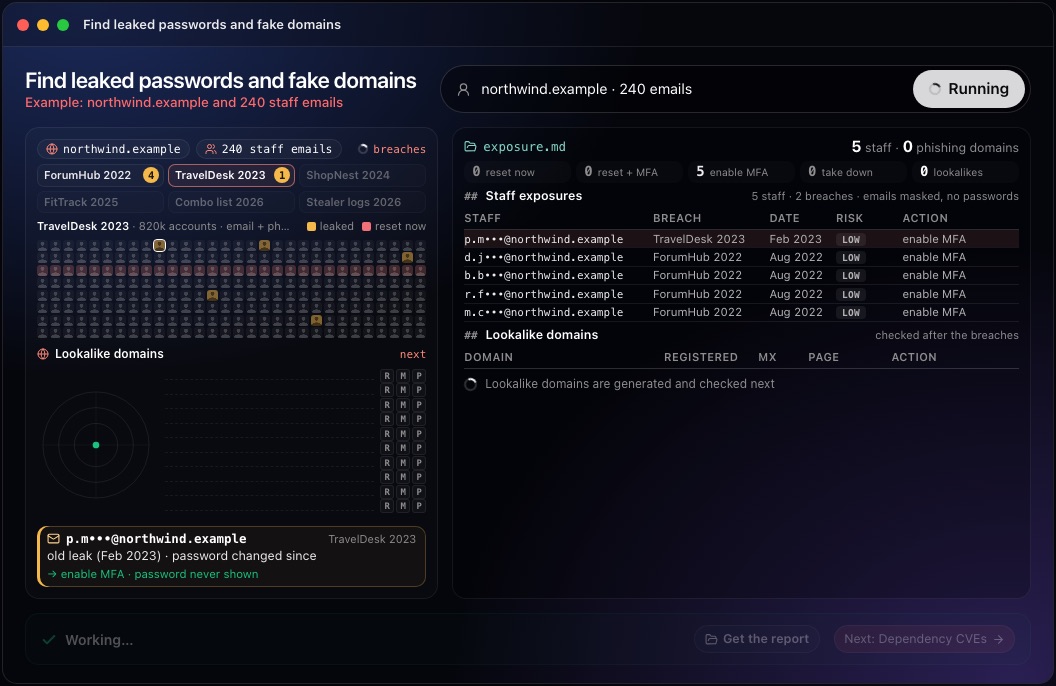
This step in the 10folds window. Example data from the animation on the home page. Rank each exposure and choose the action
A work login stolen last week outranks ten old forum accounts.
What to do
- Rank by recency, by source (infostealer logs and combined lists above old single-site breaches) and by whether the login is a work or single sign-on account.
- Force a reset for recent work credentials and sign the account out of every active session.
- Require multi-factor authentication on every exposed account.
- For old leaks where the password has since changed, turn on multi-factor authentication and remind the person not to reuse passwords.
Why
Most old breaches carry passwords changed long ago. Recent infostealer logs often include session cookies that keep working after a password reset, which is why active sessions must be ended too. Contact affected staff privately and explain what to do. Many leaks come from using a work address on an outside site that was later breached. Keep the person's name out of wide reports: the action concerns the account, and a masked address is enough for whoever carries it out.
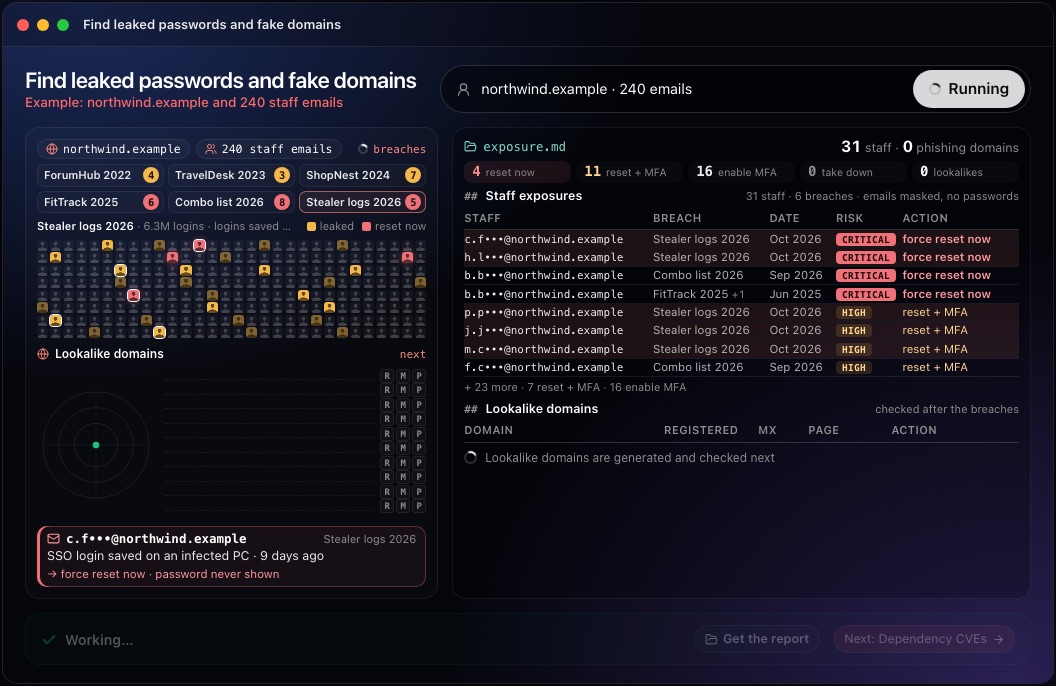
This step in the 10folds window. Example data from the animation on the home page. Find lookalike domains
List the domains an attacker would register before they do.
What to do
- Generate variants of your domain: typosquatting (missing, doubled or swapped letters), look-alike characters, added words such as login or help, and other endings.
- Check which variants are registered, and when.
- Watch certificate transparency logs, the public record of issued certificates, for new names that resemble yours.
- For each registered variant, note whether it has mail servers (MX records) and what page it serves.
- Record who registered each variant when the registration record shows it, and which registrar holds it.
Why
Criminals often register a lookalike domain shortly before a campaign. A recent registration with mail servers and a copied sign-in page is a strong warning; a parked domain from years ago usually is not. Look first at variants that resemble sign-in or support pages, since those are the ones used to collect passwords.
Act on what you found
Every finding ends with a reset, a block or a takedown request.
What to do
- Send a takedown request to the registrar and the host for domains that copy your site or brand, with screenshots as evidence.
- Block active lookalikes in your email filter and web proxy.
- Warn staff and, where needed, customers about the specific domains.
- Keep parked lookalikes on a watch list and check them again.
- Record what was done, and when, for each account and domain.
Why
Takedowns take time, so blocking protects your staff while the request is processed. A watch list catches a parked domain the day it starts sending mail. Legal action against a domain owner is a matter for counsel. Keep the evidence together (screenshots, registration dates, mail records), because registrars and hosts ask for it.
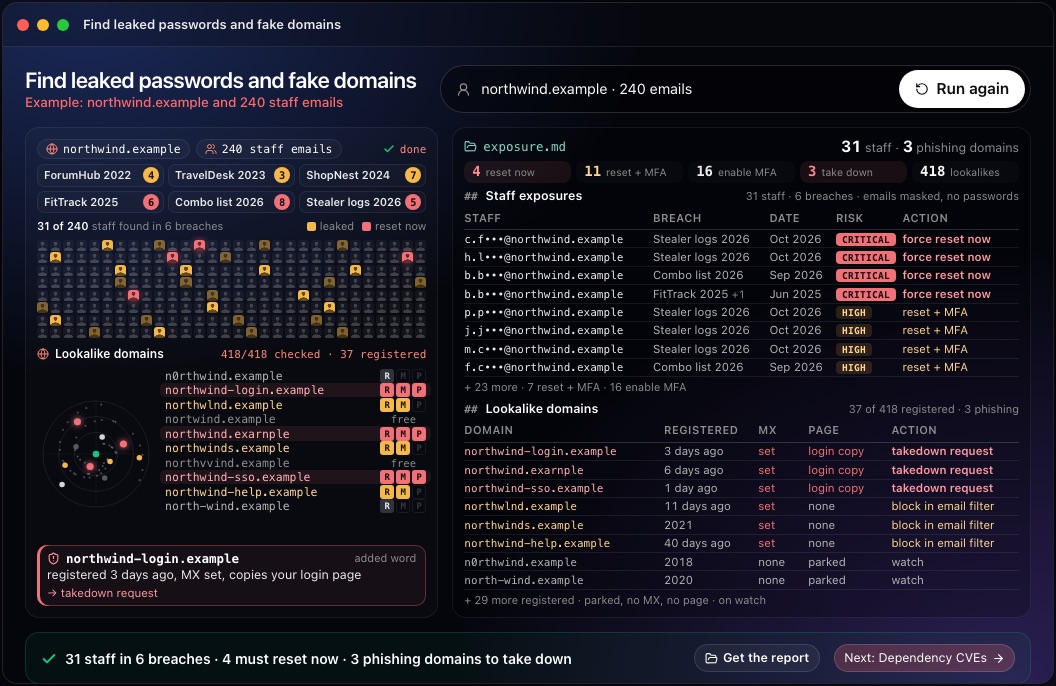
This step in the 10folds window. Example data from the animation on the home page. Repeat the check on a schedule
A clean result today says nothing about next month's breach.
What to do
- Run the breach search again regularly, and turn on notifications from your breach service where it offers them.
- Generate and check lookalike domains again, since new ones are registered all the time.
- Recheck parked lookalikes for new mail servers or pages.
- Compare with the previous run so only new exposures need attention.
- Review what changed since the last run and send new actions to the right people.
Why
New breaches and dumps of stolen logins appear constantly, and lookalike domains are often registered days before they are used. A regular check shortens the time between a leak and the reset, which is the window an attacker relies on. Keeping each run's results also shows whether resets and takedowns were completed, and how long each one took.
Common mistakes
- Downloading breach dumps yourselfHandling stolen data creates legal risk and adds nothing a reputable service does not already give you.
- Treating every hit the sameA ten-year-old breach and a session stolen last week need different responses. Rank by date, source and type of account.
- Resetting without ending sessionsStolen session cookies can keep working after a password change.
- Watching only exact typosPhishing domains often add words such as login or support. Generate variants with added words, hyphens and other endings as well.
- Ignoring parked domainsA parked lookalike can start sending mail any day.
What a good result looks like
- Every exposed staff address, masked, with the breach, its date and the data exposed.
- A risk level and an action per account: reset now, reset and add multi-factor, or add multi-factor.
- Registered lookalike domains with registration date, mail servers and page content.
- One action per domain: takedown request, block or watch.
- No passwords anywhere in the report.
And then what? Using the result
- Force the urgent resets and end active sessions today.
- Turn on multi-factor authentication for every exposed account, then for everyone.
- File takedown requests for domains that copy your sign-in page.
- Add active lookalikes to your email filter.
- Run the check again regularly. New breaches and registrations appear all the time.
When to run it
- After a large public breachCheck whether staff used their work address on the breached service. Staff often reuse work addresses on outside services, and a breach there can expose a password they also use at work.
- When customers report odd emails in your nameA lookalike domain is the usual source. Check for recently registered lookalikes with mail servers.
- Before rolling out multi-factor authenticationA list of exposed accounts shows where to start.
- As a regular checkStolen logins and new domain registrations appear constantly. A monthly rhythm suits many small organizations, with an extra run after any large public breach.
Questions people ask
How do I check if employee emails were in a data breach?
Use a reputable breach notification service that offers a domain search, prove you own the domain, and review the results by breach and date. Do not download breach dumps yourself. Mask addresses in anything you share widely.
What is a lookalike domain?
It is a domain built to be mistaken for yours, using a typo, a swapped character, an added word or a different ending. It is used for phishing and fraud. Most are registered shortly before a phishing campaign.
How do you detect phishing domains impersonating your company?
Generate variants of your domain, check which ones are registered, watch certificate transparency logs for new certificates, and inspect the mail servers and pages of the registered ones. A recent registration with mail servers and a copy of your page is the clearest sign.
What should you do when credentials are leaked?
Reset the password, end active sessions, require multi-factor authentication and check the account's recent activity for misuse. Then ask the person whether the same password was used anywhere else, and change it there too.
Is leaked credential monitoring the same as dark web monitoring?
It is one part of it. Dark web monitoring watches criminal forums and markets broadly; leaked credential monitoring focuses on your own staff addresses.
Should you tell staff their credentials were leaked?
Yes, privately, with the breach, the date and the steps to take. Explain that the check protects the account and is not a judgment of the person. The 10folds result is meant as a draft for the person responsible for security, who decides what to send.
More jobs in Cybersecurity
Find leaked passwords and fake domains, on your own Mac.Free app. Runs on your Mac with the Claude or Codex plan you already have. Your files stay on your computer.
Download for Mac