
Technical SEO audit: how to find, fix and verify site faults
A technical SEO audit, step by step: crawl the site like a search engine, confirm each fault, trace it to its template, fix it and re-crawl to verify.
Free app. Runs on your Mac with the Claude or Codex plan you already have.
What a technical SEO audit is
A technical SEO audit checks whether search engines can find, read and index every page of a site that should be in search, and whether anything in how the site is built holds those pages back. It covers crawlability, indexing, redirects, canonical tags, the XML sitemap and robots.txt, speed on mobile, structured data and internal links. The output that matters is a list of faults that have been confirmed, traced to their cause and fixed. A health score on its own changes nothing on the site.
Most audits stop at a report of several hundred warnings, many of them false alarms, with no link to the code that causes them. On most sites, one template produces the same fault on hundreds of pages, so finding that template fixes them all at once. The method below is how a technical SEO specialist does it by hand. Each step says what to do and why, then how 10folds carries it out. The same discipline applies whether the site has fifty pages or fifty thousand: plan, crawl, confirm, trace, fix and verify.
What it does for the business
- Pages that can be found can rankA page blocked by robots.txt, pointed elsewhere by a wrong canonical tag or missing from the index cannot rank, however good it is. Fixing access is the base for every other SEO effort. It is also the cheapest part of SEO to get right, because a fixed fault stays fixed until someone changes the template again.
- One fix, hundreds of pagesMost technical faults come from shared templates. Fixing the template repairs every page built from it, which is why tracing faults to their source matters more than listing them.
- Safer launches and migrationsRunning the audit before a redesign or a domain move catches broken redirects, lost pages and blocked sections before they cost visits.
- Less time on false alarmsConfirming each fault before reporting it means the people fixing the site work on real problems, in order of impact. A short list that holds up under a second look is also easier to get approved and scheduled.
Technical SEO audit, step by step
Plan the crawl
Know what should be in search before you check what is.
What to do
- List the site's sections, languages and templates: home, categories, products or services, articles, location pages.
- Read robots.txt and the XML sitemap to see what the site says it wants crawled.
- Decide which sections to crawl as a phone and which as a desktop.
- If you have Google Search Console, note the indexing report and any manual action or security issue.
Why
An audit without a plan misses whole sections, often a blog on a subfolder or a second language. Knowing the templates upfront also makes it easier to trace faults later. Comparing what the sitemap lists with what the crawl finds is one of the fastest checks in any audit: pages in one and missing from the other usually point to a fault.
Crawl the site like a search engine
Search engines see the page they are served, not the one you see in your browser.
What to do
- Crawl every reachable page, following links from the home page and the sitemap.
- Record status codes, redirects, canonical tags, indexing directives, titles and descriptions.
- Check page speed on mobile against Core Web Vitals, the measures Google uses for loading, responsiveness and visual stability.
- Check structured data, language tags and internal links, including pages no link points to.
Why
Crawlability problems hide where people do not look: a redirect chain of three hops, a section blocked by mistake, pages linked from nowhere. Only a full crawl shows them across the site. Record what a search engine receives, not what a browser shows after scripts run: content that only appears after JavaScript may be read late or not at all.
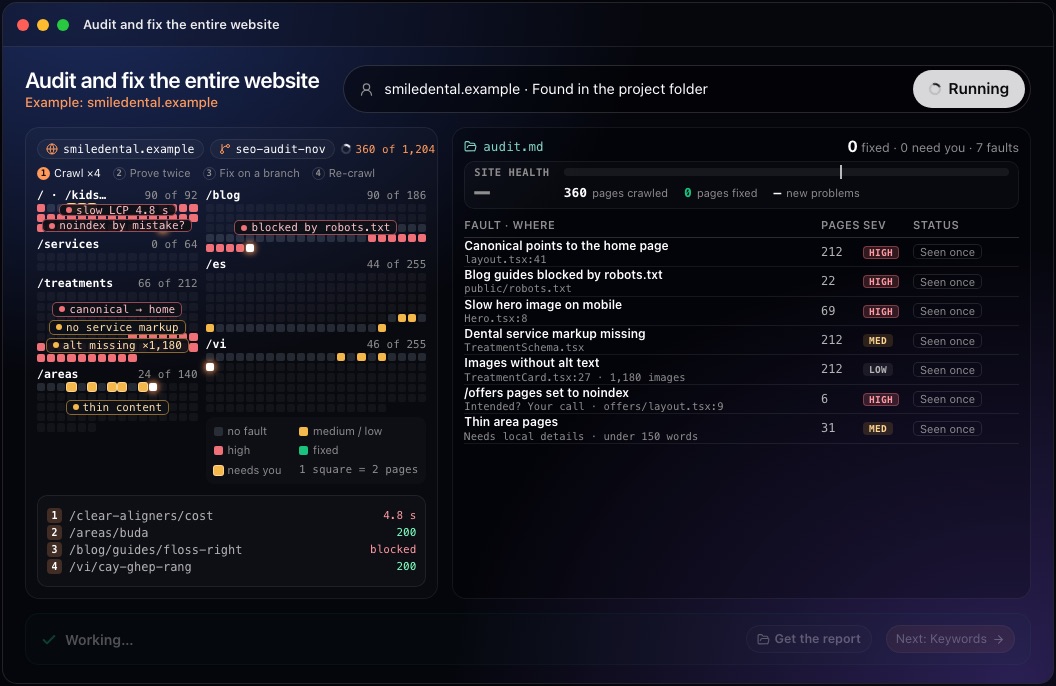
This step in the 10folds window. Example data from the animation on the home page. Prove each fault twice
A fault seen once is a suspicion.
What to do
- Recheck each suspected fault with a second, independent crawl or a different device.
- Drop anything the second check does not confirm.
- Count the pages affected by each confirmed fault.
- Rate each one by impact: whether the affected pages can still be found, read and indexed.
Why
Crawlers report false alarms: a timeout, a page that loads slowly once, a rule that only fires for one user agent. Reporting them wastes developer time and erodes trust in the audit. Rating by impact keeps attention on faults that stop pages being found or indexed, ahead of cosmetic warnings such as a description a few characters too long.
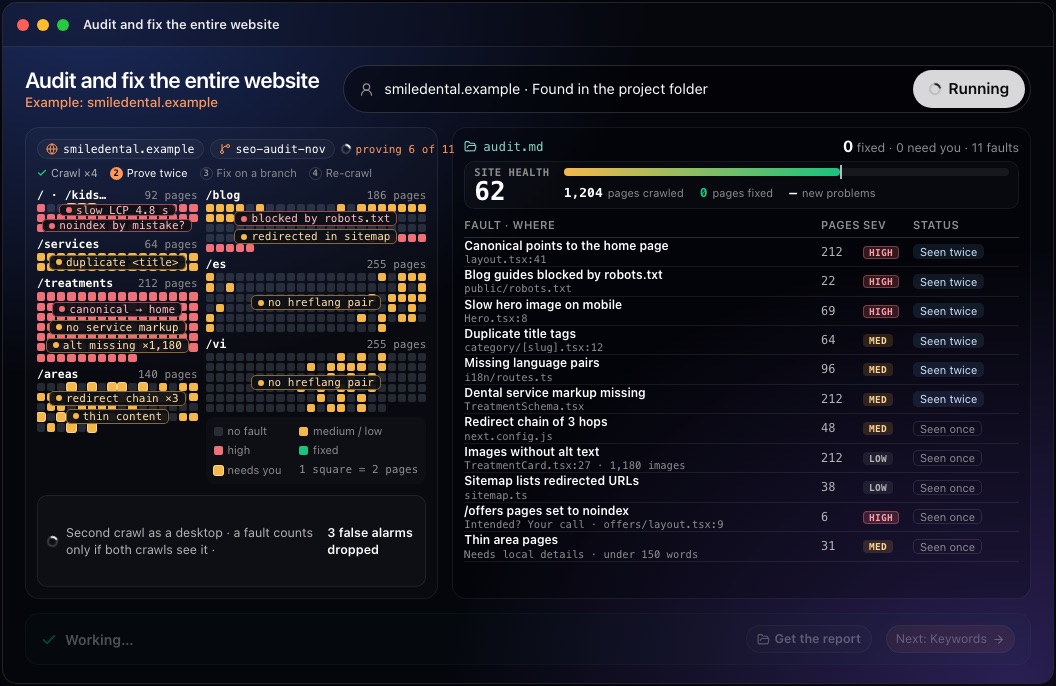
This step in the 10folds window. Example data from the animation on the home page. Trace each fault to its source
Fix the template, and every page built from it is fixed.
What to do
- Find the template, component or configuration file that produces each fault.
- Note the file and the line, so a developer can find it in seconds.
- Separate faults that are certainly wrong from choices that may be deliberate, such as a section set to noindex.
- Order the fixes by pages affected and severity.
Why
Two hundred blog pages with a canonical tag pointing to the home page usually have one cause in the layout. A report that lists two hundred URLs hides that; a report that names the file solves it. Some findings are not faults at all: a section kept out of search on purpose, or a redirect left in place for a reason. Those need the owner's decision, so keep them apart from the certain faults.
Fix it on a branch
A fix nobody can review is a new risk.
What to do
- Make each fix on a separate branch of the code, never on the live site.
- Keep each fix small and explained, one fault at a time.
- Leave decisions that need business knowledge, such as thin location pages, to the owner.
- Run the site locally and check that nothing else changed.
Why
Changes to templates touch many pages at once. A branch keeps every change visible and reversible until someone has looked at it. Small fixes, each tied to one fault, also make it easy to see which change fixed what if a problem appears later.
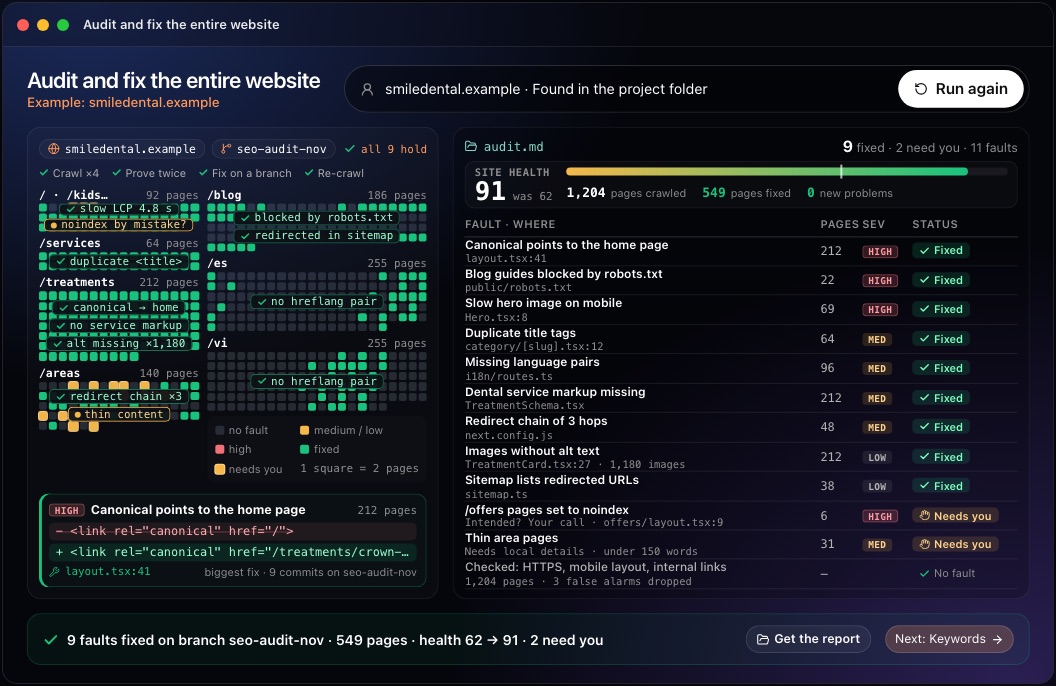
This step in the 10folds window. Example data from the animation on the home page. Re-crawl until it holds, then review
The crawl decides whether a fault is fixed, not the person who fixed it.
What to do
- Crawl the fixed site again with the same settings.
- Confirm each fault is gone on every page it affected.
- Check that the fixes created no new problems.
- Review the branch and merge it, then plan the next audit.
Why
A fix can work on one page and fail on another, or break something nearby. A second crawl is the only proof. Resubmitting the sitemap after the merge helps search engines find the corrected pages sooner.
Common mistakes
- Reporting every warningConfirm each fault first. False alarms bury the real ones.
- Listing URLs instead of causesName the template or file. One fix may repair hundreds of pages.
- Fixing directly on the live siteUse a branch so every change can be reviewed and reversed.
- Forgetting other sections and languagesCrawl blogs on subfolders, location pages and every language version.
- Skipping the re-crawlA fix is only confirmed when a new crawl shows it.
What a good result looks like
- A short list of confirmed faults, each with the pages affected and a severity.
- Each fault traced to a file and line in the site's code.
- Fixes ready on a branch, separate from the live site.
- A re-crawl showing the faults gone and no new problems.
- Faults that need a business decision, set apart for the owner.
And then what? Using the result
- Review the branch and merge it.
- Decide on the faults left for you, such as pages set to noindex on purpose.
- Resubmit the XML sitemap in Search Console after the merge.
- Run the audit again next month or before any release that changes templates.
When to run it
- Every month, for client sitesA monthly audit catches faults introduced by new releases before they cost visits.
- Before a migration or redesignIt checks redirects, indexing and templates before the change goes live.
- After an unexplained traffic dropTechnical faults such as a removed canonical tag or a blocked section are common causes. An audit run soon after the drop narrows the search to what changed.
Questions people ask
How do you do a technical SEO audit?
Plan which sections should be in search, crawl the site the way a search engine does, confirm each fault a second time, trace it to the template that causes it, fix it on a branch and crawl again to confirm the fix.
What should a technical SEO audit include?
Crawlability and indexing, robots.txt and the XML sitemap, status codes and redirect chains, canonical tags, titles and descriptions, mobile speed and Core Web Vitals, structured data, language tags and internal links.
How often should you audit a website?
Monthly for sites that release often, and before any migration or redesign. A smaller, stable site can be audited every quarter. Any release that changes templates, navigation or URLs is a good moment for an extra crawl.
What tools do you need for a technical SEO audit?
A crawler, Google Search Console for indexing and manual actions, a speed test, and access to the site's code if you want to fix what you find.
What is the difference between an SEO audit and a technical SEO audit?
An SEO audit can also cover content, keywords and links. A technical SEO audit looks only at whether search engines can crawl, render and index the site.
Does 10folds change my live website?
No. Fixes are made on a branch of your code in the project folder. Nothing goes live until you review and merge it.
More jobs in SEO agencies
Audit and fix the entire website, on your own Mac.Free app. Runs on your Mac with the Claude or Codex plan you already have. Your files stay on your computer.
Download for Mac