
Dependency vulnerability scanning: how to catch new CVEs in the code you ship
Dependency vulnerability scanning done well: list every library you run, match new CVEs to exact versions, and fix the reachable ones first.
Free app. Runs on your Mac with the Claude or Codex plan you already have.
What dependency vulnerability scanning is
Dependency vulnerability scanning is the work of listing every open-source library your software uses, at the exact version you ship, and checking that list against newly published CVEs. A CVE (Common Vulnerabilities and Exposures entry) is a public identifier for one known security flaw. Done well, the result is a short list of upgrades in order of urgency. Done badly, it is a dashboard of several hundred alerts that the team learns to ignore. It is one part of software composition analysis, the wider practice of knowing what third-party code you ship.
The method below is how an experienced application security engineer does it. Each step says what to do and why, then how 10folds carries it out. Scan only code and systems you own or are authorized to assess, and treat the result as a draft for the engineer who owns the fix. The method is the same whatever the language. JavaScript, Python, Go, Rust and Java projects all have a lockfile or an equivalent, and the reasoning about versions and reachability does not change.
What it does for the business
- Fix the few that matter firstMany new CVEs in a dependency tree touch code paths you never call. Sorting them by reachability lets a small team spend its week on the two upgrades that close a real door. The rest stays visible and ranked for when time allows.
- Know your exposure the day a flaw is publishedWith a current inventory, a new CVE becomes a lookup instead of a scramble. You can tell a customer or a manager within the hour whether you are affected, and where.
- Answer security questionnaires with evidenceCustomers ask how you track third-party code. An inventory and a dated record of what was found and fixed is a direct answer.
- Keep upgrades small and regularCatching issues as they appear means one version bump at a time. Waiting a year turns the same fix into a risky jump across several major versions.
Dependency vulnerability scanning, step by step
Build an exact inventory
You cannot patch a library you do not know you run.
What to do
- List every repository that ships code, including internal tools and scripts that run in production.
- Read the lockfile in each one (package-lock.json, poetry.lock, go.sum, Cargo.lock) to get the exact resolved versions, not the ranges in the manifest.
- Include transitive dependencies, the libraries your libraries pull in.
- Save the result as a software bill of materials (SBOM), a machine-readable list of every component and its version.
Why
A manifest says a project accepts any version in a range. The lockfile says which one is installed. Matching a CVE against a range produces both false alarms and misses. Transitive dependencies often outnumber direct ones by a wide margin, and many flaws sit there. An SBOM also pays off later. When the next widely reported flaw appears, you search one file instead of every repository.
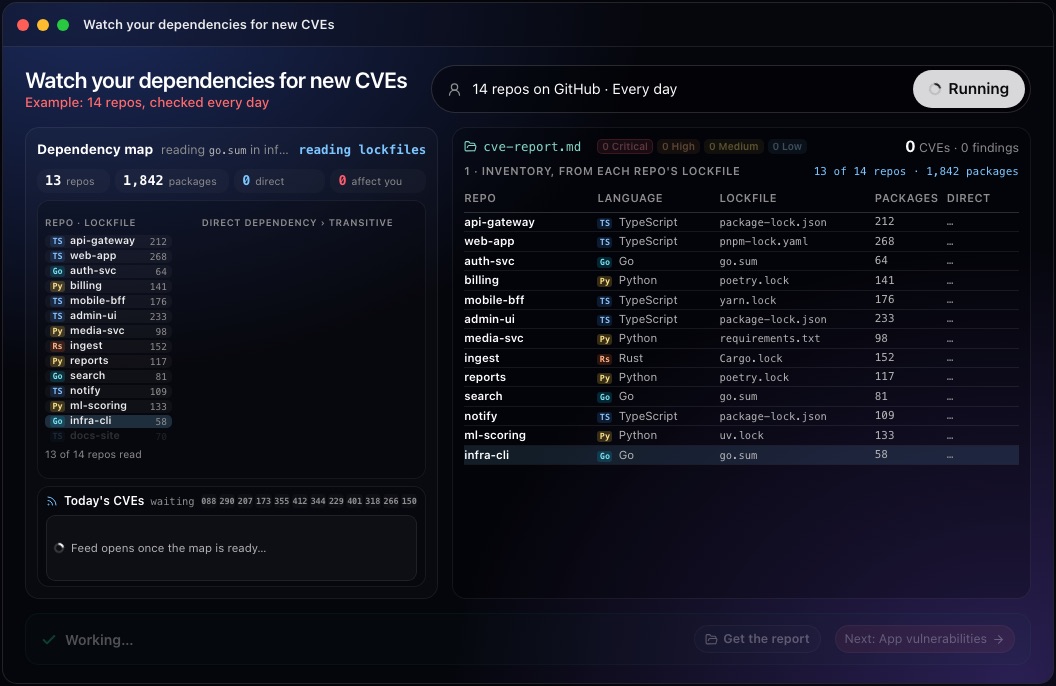
This step in the 10folds window. Example data from the animation on the home page. Match new CVEs against exact versions
A CVE matters to you only if your version falls inside its affected range.
What to do
- Pull new advisories every day from the National Vulnerability Database, the GitHub Advisory Database and the security feeds of your language ecosystems.
- For each advisory, compare its affected version range with the exact versions in your inventory.
- Drop advisories for packages you do not use and for versions you have already moved past.
- Record which repositories carry the affected version, directly or through another library.
Why
Advisory databases differ in speed and naming, so a single source misses things. Matching on the package name alone floods the team with alerts for versions it no longer runs, and false alarms are what make people stop reading. Keep each advisory's identifier and link with the match, so anyone reviewing the result can open the source and confirm the affected range.
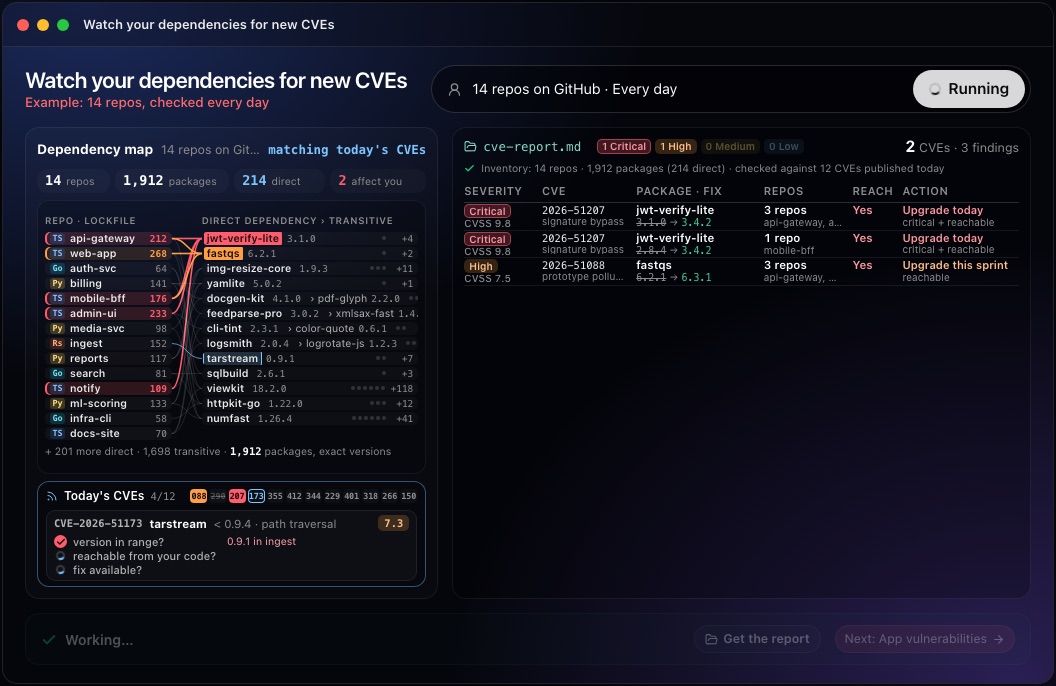
This step in the 10folds window. Example data from the animation on the home page. Decide what is reachable and exploitable
Severity describes the flaw; risk describes your exposure to it.
What to do
- Read the advisory: which input triggers the flaw, and which function or feature is involved.
- Check whether your code calls that function or enables that feature. This is reachability analysis.
- Add exploit signals: EPSS (the Exploit Prediction Scoring System, an estimate of the chance a flaw will be exploited), lists of flaws known to be exploited, and public proof-of-concept code.
- Note whether the affected service faces the internet or handles sensitive data.
Why
CVSS, the Common Vulnerability Scoring System, rates how bad a flaw is in general. A 9.8 in a parser you never call matters less than a 7.5 on your sign-in path. Reachability and exploit evidence turn a long list into a short one. Reachability is a judgement, so write down the reason, for example: the vulnerable function parses uploaded archives, and this service accepts uploads. When unsure, treat the finding as reachable until someone checks.
Rank the findings and write the fix
A finding without a named action is only a worry.
What to do
- Sort the findings: reachable and critical first, then reachable, then not reachable.
- For each one, give the fixed version and the upgrade path, including the direct dependency to bump when the flaw is transitive.
- Where no fix exists, write a mitigation: a configuration change, input validation, or turning the feature off.
- When you accept a risk, record why and a date to look at it again.
- Open one change per upgrade and run the test suite before merging.
Why
Engineers act on a specific version number and a reason. Recording accepted risks stops the same alert from being triaged again every morning and leaves a clear trail for an auditor. When one upgrade fixes several findings at once, say so, because it is often the cheapest work on the list. Group upgrades by repository so each team gets one clear set of changes.
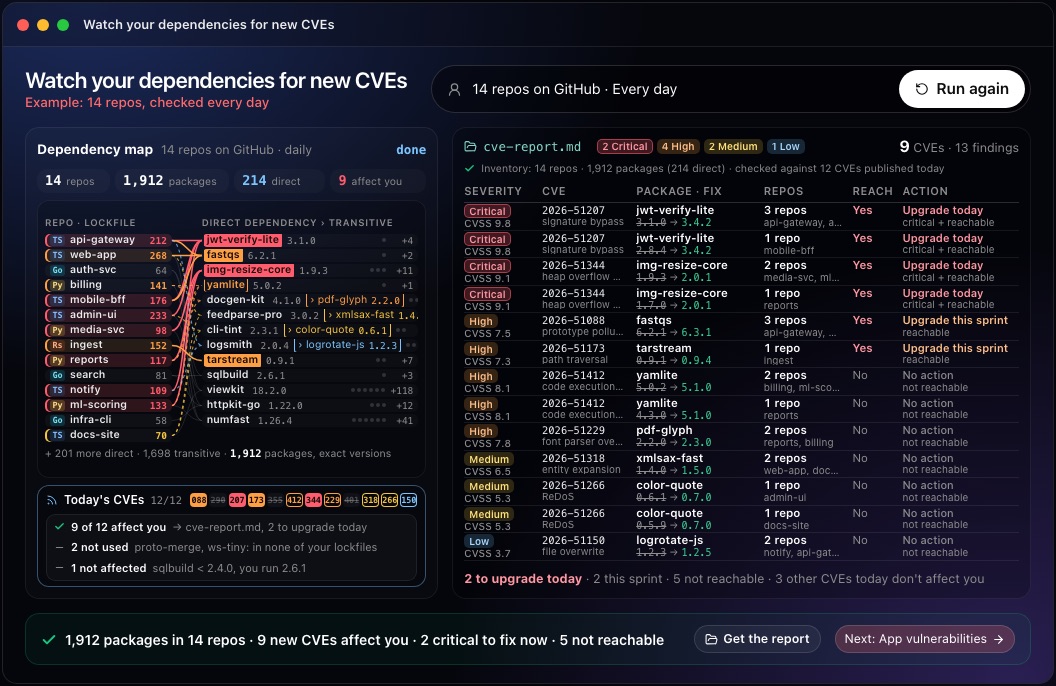
This step in the 10folds window. Example data from the animation on the home page. Repeat on a schedule
An inventory from last month describes software you no longer ship.
What to do
- Rebuild the inventory whenever lockfiles change, and at least daily for active repositories.
- Check new advisories against it every day.
- Compare each run with the previous one: new, fixed, still open.
- Review accepted risks on their review date.
Why
New CVEs are published every day and code changes every week. A daily check keeps the gap between disclosure and your fix as short as it can be. Comparing runs also shows whether the team is keeping up. A list that grows every week points to a staffing or process problem worth raising.
Common mistakes
- Matching on package namesWithout the exact version, many alerts concern code you no longer run.
- Ignoring transitive dependenciesThe flaw is often two levels down, in a library you never chose.
- Sorting by CVSS aloneA high score on unreachable code can wait; a lower one on your sign-in path cannot.
- Letting alerts pile upAn unread backlog of hundreds teaches the team that alerts do not matter.
- Upgrading without testsA rushed major version bump can break production faster than the flaw would have.
What a good result looks like
- An inventory built from lockfiles, with exact versions and transitive dependencies.
- Each finding: the CVE, the package, the version you run, the fixed version and the affected repos.
- A reachability verdict and the reason for each priority.
- A named action for every finding, including accepted risks with a review date.
- One summary line someone could repeat: how many to fix today.
And then what? Using the result
- Open the upgrade changes for critical, reachable findings today.
- Schedule the remaining reachable upgrades into the current sprint.
- Record accepted risks with an owner and a review date.
- Add a dependency check to your pull request pipeline so new flaws are caught before merge.
- Keep the SBOM for customer security questionnaires.
When to run it
- When a major CVE makes the newsWith a current inventory you can say within minutes whether you are affected and in which repositories.
- Before a customer security reviewA dated list of findings and fixes shows that third-party code is tracked.
- When you inherit a codebaseThe first inventory shows how old the dependencies are and where the risk sits. It also shows which repositories nobody has updated in a long time.
- As a daily routine for active productsSmall, regular upgrades cost less than one large catch-up.
Questions people ask
What is dependency vulnerability scanning?
It is checking every open-source library your software uses, at the exact version you ship, against public lists of known flaws called CVEs. The aim is a short, ranked list of upgrades. It works from lockfiles, so it reflects what is actually installed.
How do you check dependencies for CVEs?
Read each project's lockfile to get exact versions, then compare them with the affected version ranges in advisory databases such as the National Vulnerability Database and the GitHub Advisory Database. Tools such as OWASP Dependency-Check, npm audit or pip-audit automate the comparison.
How do you prioritize CVE findings?
Start with findings that your code can reach and that have exploit evidence, then use CVSS severity to order the rest. Internet-facing services and sensitive data move a finding up. Write the reason next to each priority so anyone can check the order.
What is a transitive dependency?
It is a library your project uses indirectly, because one of your direct dependencies needs it. You fix it by upgrading the direct dependency or by pinning a safe version of the transitive one. Lockfiles list transitive dependencies, which is why they are the right starting point.
How often should you scan dependencies?
Check new advisories against your inventory every day, and rebuild the inventory whenever a lockfile changes. New CVEs are published daily, so a weekly or monthly scan leaves known flaws open for longer than it needs to.
Does it replace a security engineer?
No. The report is meant as a draft for the engineer who owns the code, who decides on upgrades and accepted risks. Only scan code you own or are authorized to assess.
More jobs in Cybersecurity
Watch your dependencies for new CVEs, on your own Mac.Free app. Runs on your Mac with the Claude or Codex plan you already have. Your files stay on your computer.
Download for Mac