
Accounts receivable aging report: how to build it and who to chase
How to build an accounts receivable aging report: sort overdue invoices into aging buckets on one date, then turn it into a ranked collections list.
Free app. Runs on your Mac with the Claude or Codex plan you already have.
What an accounts receivable aging report is
An accounts receivable aging report lists every unpaid customer invoice on one stated date and sorts it by how long it is past due. It answers three questions: how much is owed, by whom, and for how long. Finance teams also call it AR aging or aged receivables. It is the starting point for collections: who to contact first, and how firmly. Most accounting tools can print one, but the printed version is only as good as the payments applied to each invoice.
The usual aging buckets are not yet due, 1 to 30 days late, 31 to 60, 61 to 90 and over 90. The older the bucket, the less likely the money is to arrive without action, and the more it weighs on cash flow. The method below is how a credit controller builds the report and the chase list by hand. Each step says what to do and why, then how 10folds carries it out. The report is a snapshot: it changes every day as invoices fall due and payments arrive, which is why the date matters so much.
What it does for the business
- Get paid soonerMoney owed to you is cash you cannot use. Working the overdue invoices every month shortens the time between invoice and payment without a single new sale. It also reduces the amount you may later have to write off as bad debt.
- Spend collection time where the money isRanking by amount and age together puts the first calls on the balances that matter most to cash flow, so an hour of chasing recovers more.
- Keep customers while you collectA tone that matches the stage, and no reminder during a dispute, means you collect what is owed without damaging the relationship. Customers who usually pay on time often need only a friendly nudge.
- See credit risk earlyThe report shows which customers slip into older buckets month after month, and how much of the total one customer holds. That is the moment to review their terms. Spotting a customer who is slowing down gives you time to ask for a deposit or shorter terms.
Accounts receivable aging report, step by step
Check the invoice export first
An aging built on unreconciled payments is worse than no aging at all.
What to do
- Find the invoice number, customer, currency, issue date, due date, total and open balance.
- Check that every payment points to exactly one invoice, in the same currency.
- Look for duplicate invoice numbers, unreadable amounts and missing due dates.
- Decide the as-of date, and whether the balances reflect that date or the export date.
- List what you cannot reconcile, and keep it visible.
Why
Exports differ between accounting tools: dates may be day-first or month-first, amounts may be in cents, and a balance column shows the position on the export date. An error here flows into every later figure. A payment applied to the wrong invoice makes one customer look late and another look paid, and both mistakes reach the customer if nobody checks.
Sort the balances into aging buckets
Aging is a picture of one day, so say which day.
What to do
- Place each open invoice in its bucket: not yet due, 1 to 30, 31 to 60, 61 to 90, or over 90 days late.
- Total by bucket and by customer, using exact amounts.
- Keep currencies apart and never convert them.
- Check that the buckets add up to the total open balance.
- Flag payments received after the as-of date.
Why
Bucket totals that do not add up mean a row was lost or counted twice. A payment received after the as-of date does not change that day's picture, but nobody should chase an invoice that has since been paid. Reporting each currency separately keeps the totals exact and avoids arguing about which exchange rate to use. Missing due dates are a common gap; without them, an invoice cannot be placed in a bucket at all.
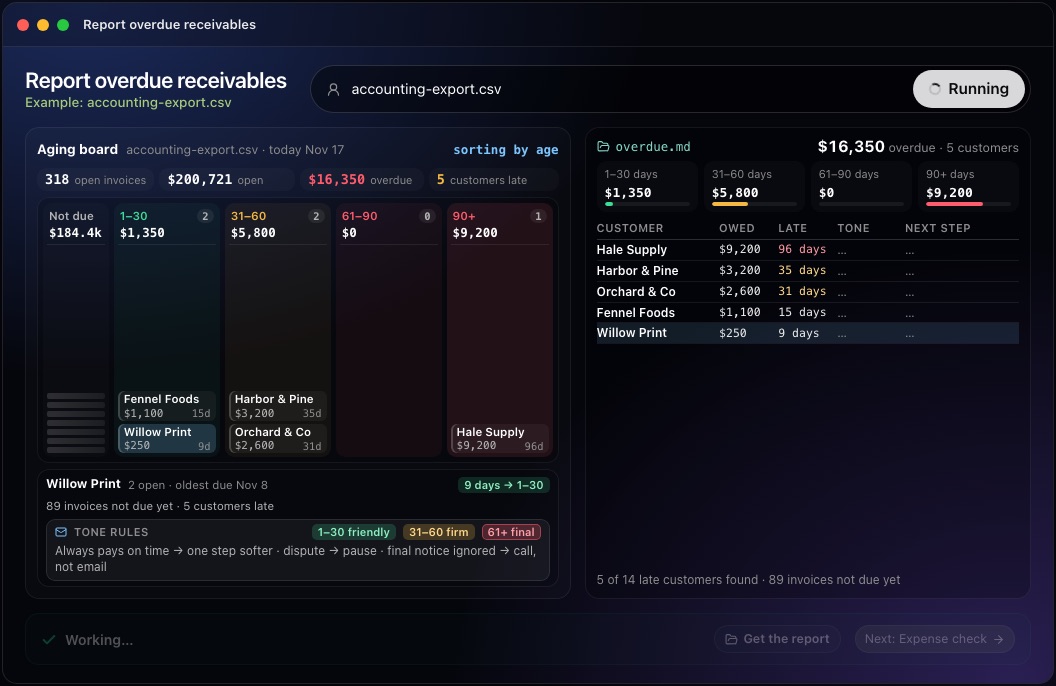
This step in the 10folds window. Example data from the animation on the home page. Decide who to chase, and how
The oldest invoice is not always the first one to chase.
What to do
- 1 to 30 days late: a friendly first payment reminder.
- 31 to 90 days: a clear second reminder with the list of invoices.
- Over 90 days, or several invoices late: a firm reminder and a phone call.
- In dispute: no reminder until it is resolved. Unapplied credits: apply them before chasing.
- Order the list by amount and age together.
Why
This rising sequence of reminders is called dunning. The tone should rise with age and with payment history. A large invoice just past due can matter more to cash than a small one ninety days old, and a reminder sent during a dispute recovers nothing. The order is a judgment, so write down why each customer sits where it does; that makes it easy to change when you learn more.
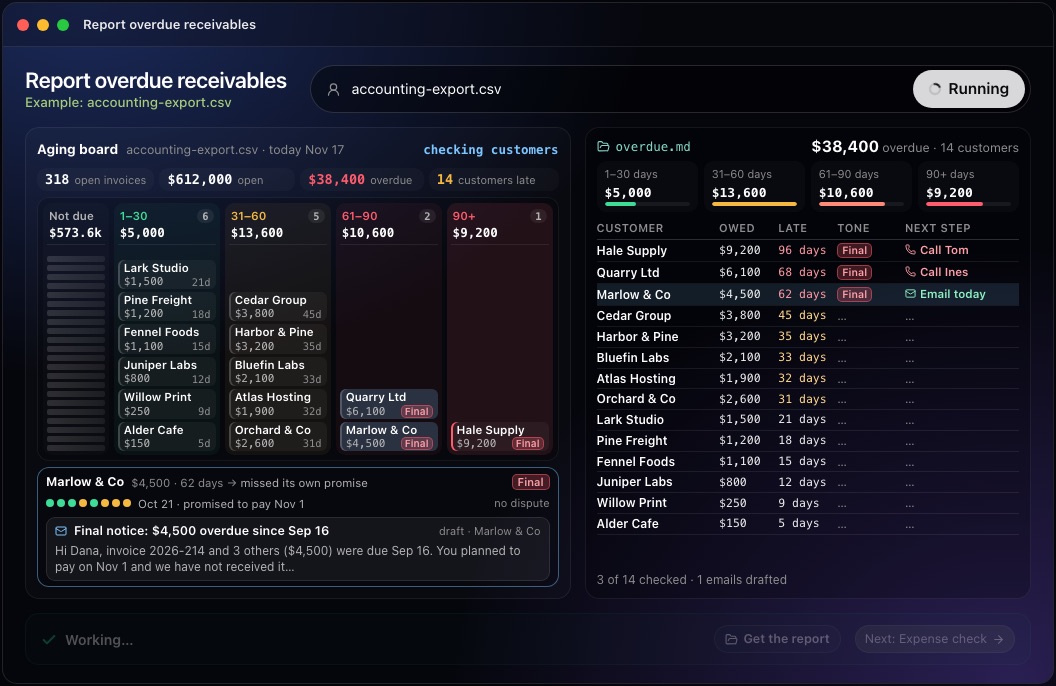
This step in the 10folds window. Example data from the animation on the home page. Write the reminders and check every figure
A reminder with the wrong amount costs more than a late one.
What to do
- Name the invoices, their numbers and their original due dates.
- State the amount due today, after any payment received since the as-of date.
- Match the wording to the stage: friendly, firm or final.
- Have someone else check every figure before anything is sent.
Why
The customer should be able to find the invoice at once. A wrong figure, or a demand for money already paid, turns a simple reminder into a dispute and slows collections. Keep the wording short and factual, with how to pay, so the customer can act without replying. A reminder that lists every open invoice for that customer also surfaces disputes nobody had mentioned.
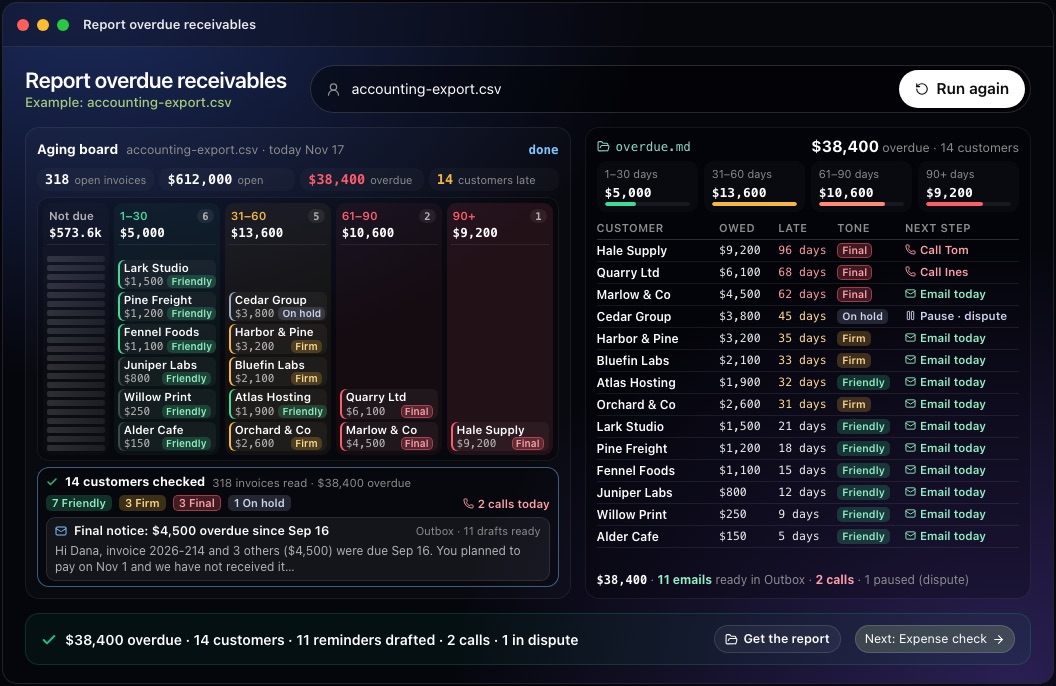
This step in the 10folds window. Example data from the animation on the home page.
Common mistakes
- No as-of dateTwo people reading the same report see different numbers.
- Netting credits without askingFlag unapplied credits and let the owner apply them.
- Chasing during a disputeResolve the dispute first, or the reminder makes it worse.
- Converting currenciesReport each currency separately, so no exchange rate is assumed.
- Reminding with old balancesA late payment may have arrived since the report date, so check the current balance first.
What a good result looks like
- One line at the top: how much is overdue, across how many customers, on which date.
- Aged receivables by bucket and by customer, for each currency.
- Every open invoice behind those totals.
- The excluded rows, each with its reason.
- One next step per late customer, in order, with a draft reminder.
And then what? Using the result
- Call the customers with the oldest large balances, with the invoice details in front of you.
- Send the reminders after checking each amount against today's balance.
- Resolve the disputes, since each one is blocking a payment.
- Apply unapplied credits before chasing those customers.
- Review the terms of customers who make a late payment every month.
When to run it
- At month end, with the closeYou get the receivables position on one stated date, ready for the management report. The same totals feed the balance sheet and any review of doubtful debts.
- Every week, when cash is tightA weekly run keeps the chase list current and shows who has moved into an older bucket. Look at who moved between buckets since last week as well as at the totals.
- Before a board meeting or a bank reviewAged receivables by customer answer the first question a lender or director asks about cash flow. It also shows whether a few customers hold most of what is owed.
Questions people ask
What is an accounts receivable aging report?
It is a list of unpaid customer invoices on one date, grouped by how long each is past due. It shows how much is owed, by whom and for how long. It is used for collections, for the month-end close and for estimating how much may never be paid.
How do you read an AR aging report?
Look at the total in each bucket first, then at the customers in the older buckets. Large balances over 60 days need action now, and a growing share in the older buckets means collections are slipping. Compare it with last month's report to see who has improved and who has slipped.
What are the aging buckets in an aging report?
The common ones are not yet due, 1 to 30, 31 to 60, 61 to 90 and over 90 days late. Some businesses split the oldest bucket further. 10folds uses these five unless your brief asks for other ranges.
How often should you run an aging report?
At least monthly, at the close. Weekly is better when cash is tight, because a chase list goes stale quickly. Run it on the same day each time so reports can be compared.
How do you calculate DSO?
Days sales outstanding is accounts receivable divided by credit sales for a period, multiplied by the number of days in that period. The 10folds job does not estimate it: the report lists DSO as not checked, because it needs an approved sales figure.
Does it send the reminders or change my accounts?
No. It writes local drafts for you to read and send yourself. No account or ledger is changed. Disputed invoices, and invoices that may already be paid, get no reminder.
More jobs in Finance
Report overdue receivables, on your own Mac.Free app. Runs on your Mac with the Claude or Codex plan you already have. Your files stay on your computer.
Download for Mac