
Attack surface mapping: how to find everything you expose online
Attack surface mapping step by step: find every domain, subdomain, server and open port you own, flag the forgotten or exposed ones, and close them.
Free app. Runs on your Mac with the Claude or Codex plan you already have.
What attack surface mapping is
Attack surface mapping is the work of finding every internet-facing asset an organization owns (domains, subdomains, servers, cloud storage, open ports) and checking what each one exposes. The attack surface is the sum of the places an attacker could try to get in. Done well, the result is an asset inventory with a short list of things to close this week. Done badly, it is a port scan nobody can tie to an owner. Most organizations expose more than they think, because every project, vendor and campaign can add a name or a server.
The method below is how a security engineer maps an external attack surface. Map and check only assets your organization owns or is authorized to assess, and look without trying to break in. The boxes show how 10folds does each step. Treat the result as a draft for the person responsible for security. Mapping differs from a penetration test: mapping records what is visible, while a penetration test tries to get in and needs its own authorization.
What it does for the business
- Find the servers everyone forgotOld staging copies, campaign sites and test APIs keep running long after the project ends. Finding them lets you close doors nobody is watching. Each server you close is one less system to patch.
- Fix what an attacker would find firstAttackers start from the same public sources. Seeing your organization the way they do shows which exposures are easiest to reach. It also gives you a factual answer when a customer asks what you expose.
- Give every asset an ownerAn inventory with owners turns a security problem into a list of named tasks. Assets with no owner become a clear decision: claim or close. Owners also know which assets can be shut down safely and which ones customers still rely on.
- Notice change earlyA weekly map shows new assets as they appear, so a misconfigured server gets fixed in days instead of being discovered months later. Change is where most new exposures come from, so watching it is where effort pays.
Attack surface mapping, step by step
Define what you own
You can only defend the assets on your list.
What to do
- List your root domains, including old brands and companies you have acquired.
- Collect your IP ranges and the cloud accounts you control.
- Confirm in writing that every item is yours or that you are authorized to assess it.
- Agree on the rules: passive and light checks only, no exploitation, no load.
Why
Scope keeps the work legal and focused. Hosting and cloud addresses change hands, so an address that was yours last year may belong to someone else now. Ask finance and marketing as well. They often know about domains and hosted tools that IT never heard of. Write the scope down with a date, because the list of what you own will change and each run should say which version it used.
Discover every asset
Every source finds assets the others miss.
What to do
- Read your DNS records and run subdomain enumeration against public data sets.
- Search certificate transparency logs, the public record of every TLS certificate issued, for names under your domains.
- List the hosts in your IP ranges and the public resources in your cloud accounts, such as storage buckets.
- Merge the lists, remove duplicates and record where each asset was found.
- Check the domain registration records for other domains registered to your organization.
Why
Passive reconnaissance with public sources finds assets without touching them. Certificate logs in particular reveal names that were never linked anywhere, which is how shadow IT, systems set up outside the usual process, tends to show up. Record the source for each asset. An asset found only in an old certificate may no longer exist and should be confirmed before anyone acts on it.
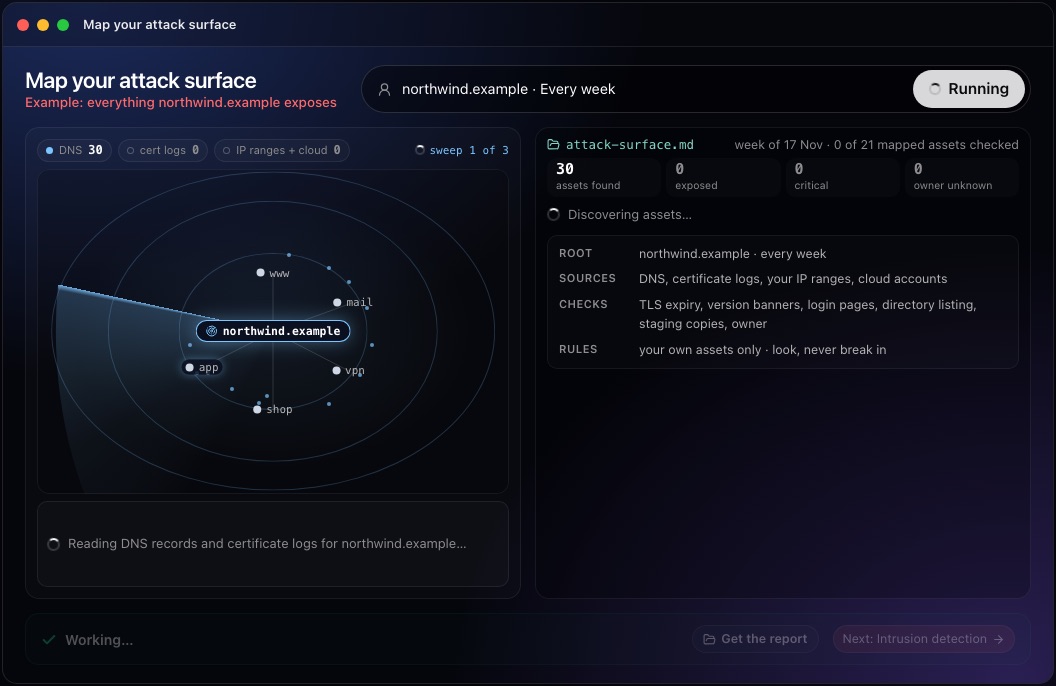
This step in the 10folds window. Example data from the animation on the home page. Check what each asset exposes
Look at the door; do not try the lock.
What to do
- List the open ports on each asset and the service behind each one.
- Note version banners, expired or expiring TLS certificates, and sign-in pages open to the internet.
- Look for directory listings, public storage buckets and staging copies of production.
- Flag remote desktop, database and file transfer ports that face the internet.
- Record the date of each check, since exposure changes from week to week.
Why
Exposure is what turns an asset into a risk. An admin sign-in or a database port reachable from anywhere invites password guessing, and an outdated version banner tells an attacker which known flaw to try. Keep these checks light: a connection, a banner, a page load. Anything that tries passwords or exploits a flaw is a penetration test.
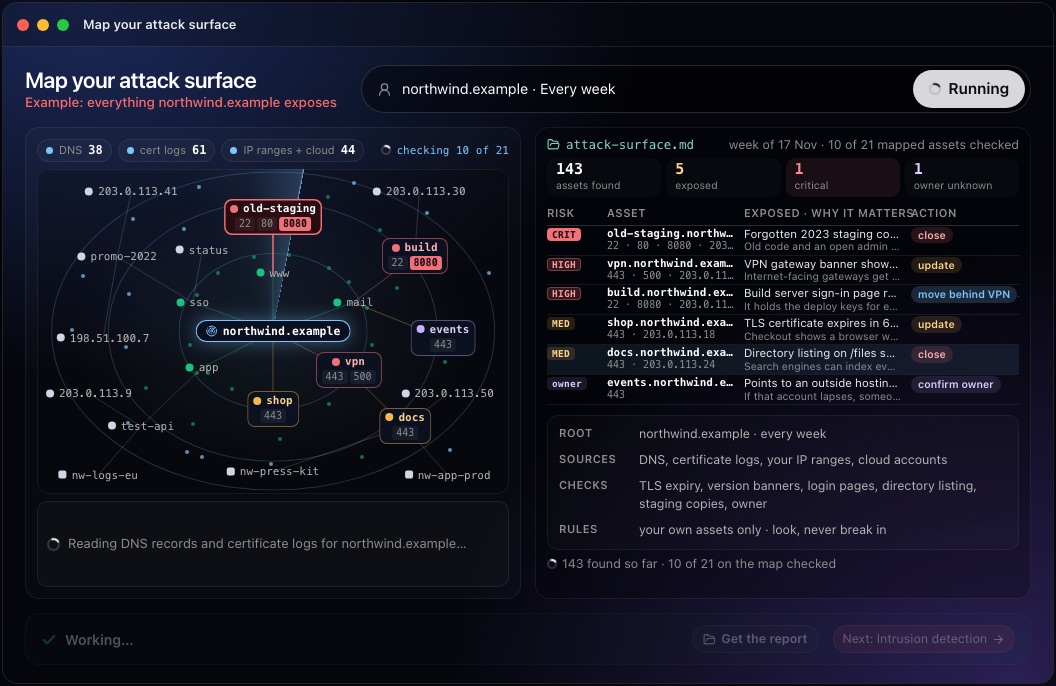
This step in the 10folds window. Example data from the animation on the home page. Rank what to close and name an owner
Close the forgotten before you polish the known.
What to do
- Rank by exposure and value: open admin access, databases and remote desktop first, then outdated software, then certificate and listing issues.
- For each item, write one action: close, update, move behind a VPN, or confirm the owner.
- Match each asset to an owner from DNS records, cloud tags or project history, and list the ones with no owner.
- Flag subdomains that point to outside services you may no longer use. Whoever claims that service can take the name over.
- Compare with the previous map to see what is new.
Why
Forgotten servers are the easiest targets because nobody patches them. A short ranked list with owners gets acted on; a raw scan export does not. A dangling subdomain lets an attacker host content under your name, which is why it ranks high even when nothing else looks exposed. Write one sentence per item on why it matters, in words an owner outside security understands.
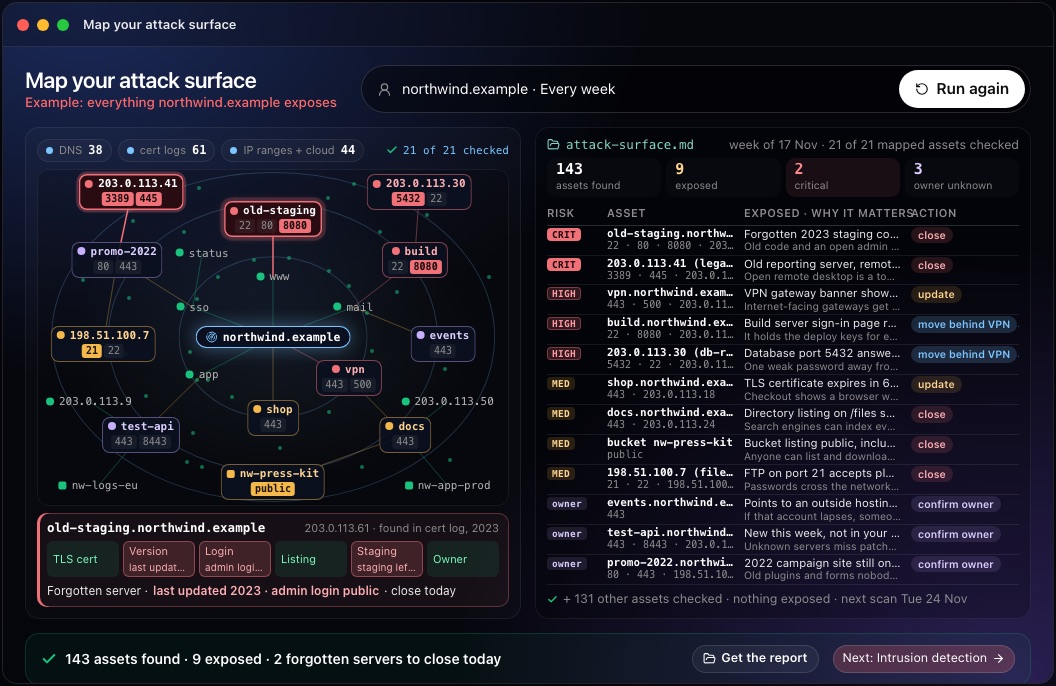
This step in the 10folds window. Example data from the animation on the home page. Watch for change every week
The asset that appeared this week is the one nobody has reviewed.
What to do
- Run discovery again on a fixed schedule, weekly for most organizations.
- Compare each run with the last: new assets, closed assets, new exposures.
- Review every new asset with its owner within the week.
- Check that closed items stay closed, and record the date each one was fixed.
Why
Teams launch campaign sites, test servers and cloud resources all the time, often without telling anyone in security. A weekly comparison turns that drift into a short list of new things to review, which is the core idea behind external attack surface management. Keep the history of each run. It shows how long an exposure stayed open, which helps when deciding where to tighten your launch process.
Common mistakes
- Scanning what you do not ownAddresses change hands. Check ownership before every run. A forgotten address may now host someone else's service.
- Relying on one discovery sourceDNS alone misses names that only appear in certificate logs.
- Probing too hardExploitation and load testing go beyond mapping and need a separate, authorized test.
- Ignoring cloud storageA public bucket is part of the attack surface even without a domain name. Check its permissions as carefully as a server's.
- Mapping onceA map from last quarter misses everything launched since.
What a good result looks like
- Every asset, with the source where it was found.
- What each one exposes: open ports, services, versions, certificates, sign-in pages.
- A risk level and one action for each exposed asset.
- An owner for each asset, or a clear unknown-owner flag.
- The changes since the last run.
And then what? Using the result
- Close or restrict the critical items today, starting with forgotten servers.
- Send each owner their list with a date.
- Decide on every asset with no owner: claim it or shut it down.
- Add new projects to the inventory when they launch.
- Run the map again next week and compare.
When to run it
- After a merger or a rebrandThe other company's old domains and servers join your attack surface on day one. Map them before they are folded into your own processes.
- Before a customer security reviewAn inventory shows that you know what you expose. Customers increasingly ask for one, and a current map makes the answer quick. Include the date of the map in your answer.
- After a cloud migrationOld servers often keep running alongside the new ones. The map shows which old servers still answer and should be shut down.
- As a weekly routineNew subdomains and test servers appear with every project. A weekly run keeps each review short.
Questions people ask
What is attack surface mapping?
It is finding every internet-facing asset your organization owns and checking what each one exposes. The result is an inventory with the risks ranked and an action named for each. It is the first step of external attack surface management. Unlike a penetration test, it does not try to get in.
How do you map your attack surface?
Start from your root domains, IP ranges and cloud accounts. Discover assets through DNS records, certificate transparency logs and cloud listings, check the open ports and services on each, then rank the exposures and assign owners. Record where each asset was found so its owner can be traced.
How do you find forgotten subdomains?
Search certificate transparency logs and public DNS data sets for names under your domains. Names nobody recognizes are often old staging or campaign sites. Confirm each one with its owner before closing it, since some old names still serve customers.
How often should you scan your attack surface?
Weekly suits most organizations, plus a run after any large launch or migration. External attack surface management tools watch continuously. Compare each run with the previous one so you only review what changed.
Is it legal to scan my own domains?
Checking assets you own or are authorized to assess is normal practice. Confirm that every address in scope is still yours, and avoid anything that could disrupt a service. Keep the written scope with each report.
What is the difference between attack surface mapping and a vulnerability scan?
Mapping finds what you expose; a vulnerability scan tests known assets for specific flaws. Mapping comes first, because a scan only covers the assets on its list. The 10folds result is meant as a draft for the person responsible for security, and any checks it runs are meant for assets you own or are authorized to assess.
More jobs in Cybersecurity
Map your attack surface, on your own Mac.Free app. Runs on your Mac with the Claude or Codex plan you already have. Your files stay on your computer.
Download for Mac