
How to find government tenders worth bidding for
How to find government tenders that fit your business: search official portals, verify each contract notice and make a clear bid/no-bid decision.
Free app. Runs on your Mac with the Claude or Codex plan you already have.
What finding government tenders involves
Learning how to find government tenders means building a routine for reading the official portals where public sector buyers advertise government contracts, and picking out the few you could win. Finding notices is easy. The work is in finding the ones that are still open, that a new supplier may enter, and that you could deliver before the deadline.
The method below is how a bid manager does it by hand. Each step says what to do and why, then how 10folds carries it out.
What it does for the business
- See contracts you would otherwise missPublic sector buyers publish on national, regional and local portals. Reading them every week by hand rarely happens, so suitable government contracts pass unnoticed. A regular search means the relevant ones reach you while there is still time to respond.
- Put bid effort where you can winA full response can take days of senior time. A clear bid/no-bid decision for each notice keeps that time for the tenders you are eligible for and able to deliver.
- Enter new markets with factsA few weeks of searching show which public buyers in a region or sector publish work that fits you, how often and on what terms. You learn this before committing a sales effort there.
- Stop losing bids to dates and versionsDeadlines, time zones and amendments are recorded from the official notice. A response is not thrown away because it arrived late or answered an outdated version.
How to find government tenders, step by step
Write the search brief
Tenders are won on evidence, so search for what you can evidence.
What to do
- List the services you deliver, where you can deliver them, and the certificates and references you can document.
- State your capacity: how much new work you can take on, and from when.
- Pick the public procurement portals that cover your region and sector. No single portal covers every buyer.
- Set keywords and classification codes such as CPV codes, the Common Procurement Vocabulary used in Europe. Widen the synonyms, not your qualifications.
Why
A loose brief returns hundreds of notices and hides the two that matter. Tender alerts from portals and tender aggregators are only as good as the brief behind them, and an aggregator may miss small local buyers.
Find and verify each official notice
A notice is only an opportunity if a new supplier can still enter.
What to do
- Open each contract notice on the official portal, with its history and latest amendment.
- Record the buyer, the official identifiers and the lot.
- Record the stage, the submission deadline and its time zone.
- Set aside awards, prior-information notices and closed frameworks as history.
Why
Notices are easy to misread. A prior-information notice announces a plan. A contract end date three years away is not a bid deadline. An amended notice replaces the original, and the change may be the one condition that matters.
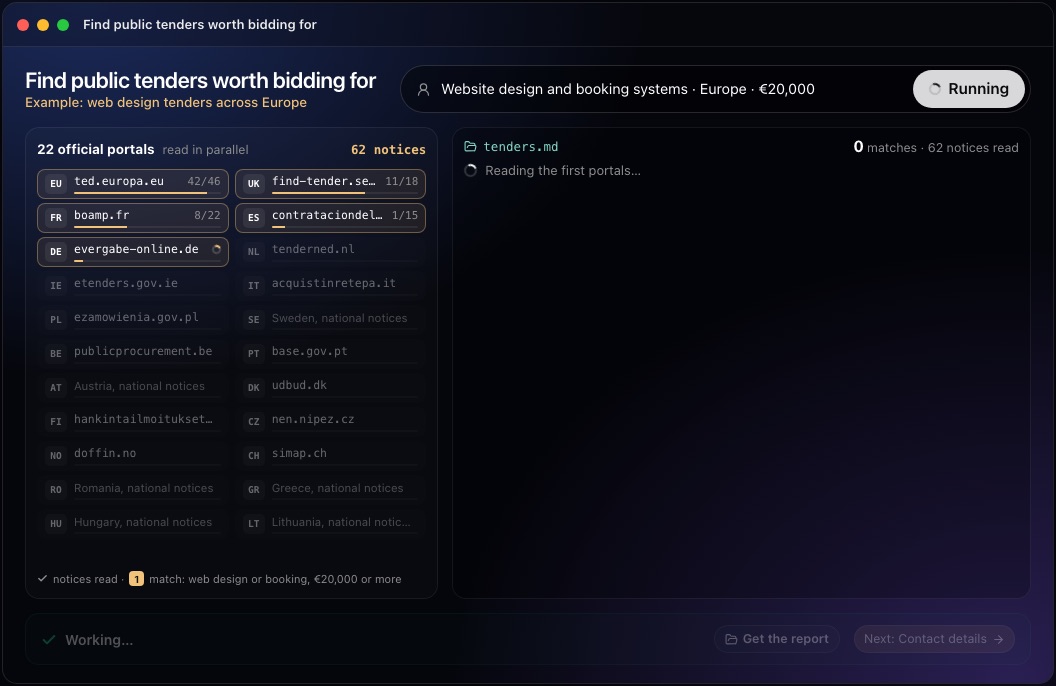
This step in the 10folds window. Example data from the animation on the home page. Make the bid/no-bid decision
Decide no-bid early. It is the cheapest decision in bidding.
What to do
- Compare each open lot with your services and delivery area.
- List the mandatory conditions, each with its source in the notice or tender documents.
- Give one of three verdicts: Bid, Review or Pass.
- Rank by fit, attainable conditions and realistic preparation time, then by urgency.
Why
Most notices are a poor fit. Saying so early, with a reason, frees time for the one or two worth a full response. A buyer's estimate is not money you will receive, and a framework value is often a ceiling, so contract values should never be added up as expected sales.
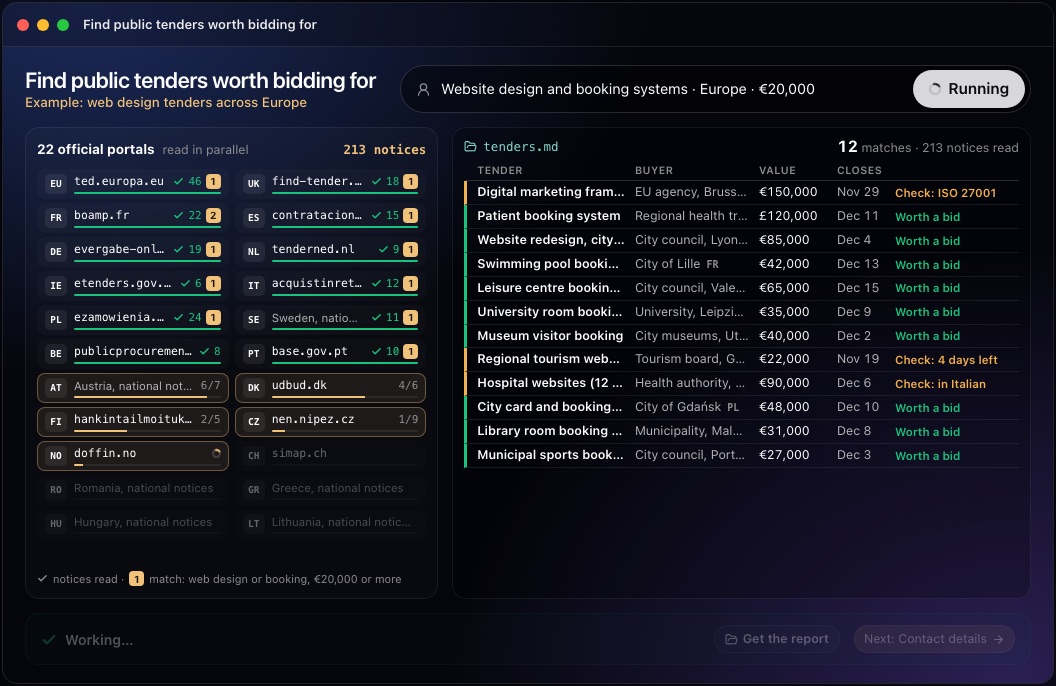
This step in the 10folds window. Example data from the animation on the home page. Check the shortlist
The top row gets the hardest check, because it costs the most if it is wrong.
What to do
- Have a second person check the top rows against the official text.
- Verify the lot, the deadline, the time zone and the latest revision.
- Confirm that nothing dismissed earlier reappears as new.
- Confirm that closed and awarded notices are out of the active list.
Why
A bid team can lose a week on a tender that closed yesterday, or that needed a certificate nobody holds. A second reader catches what the first one assumed.
Hand over the decisions and keep the ledger
The output is a decision for each tender, with the evidence beside it.
What to do
- Write one row per opportunity: buyer, verdict, what changed, deadline with time zone, fit and gaps, next action.
- Lead with the most useful finding.
- Say what was searched and what could not be reached.
- Keep a record of every notice seen and every decision taken.
Why
Whoever decides needs to see in a minute what deserves effort and what is still missing. Notices are amended and reposted, so without a record the same tender is read again each week.
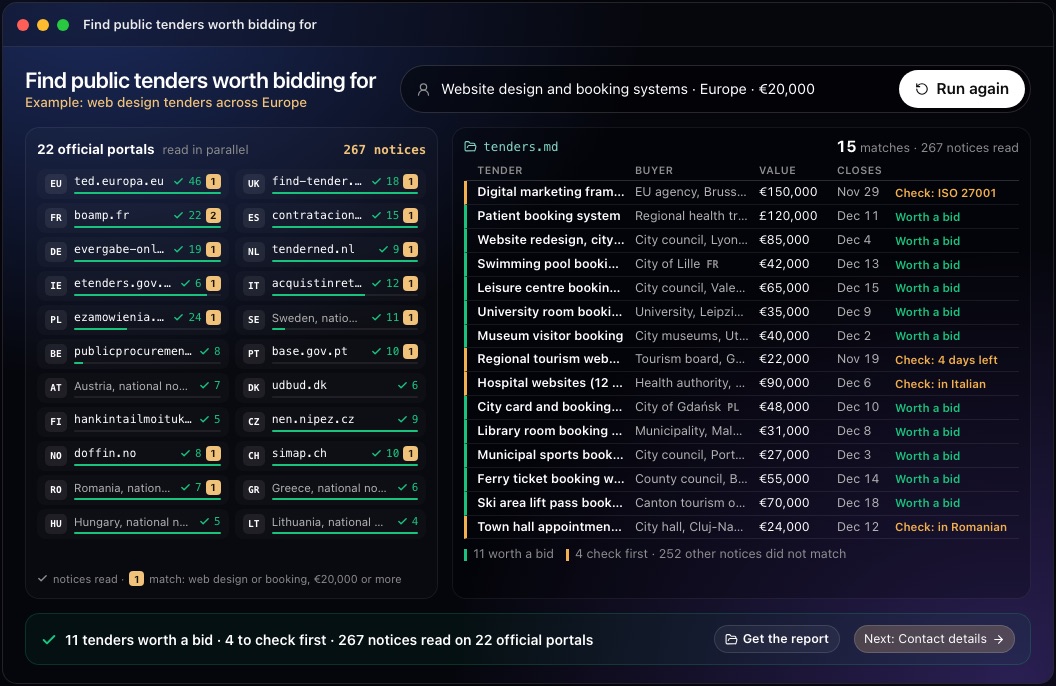
This step in the 10folds window. Example data from the animation on the home page.
Common mistakes
- Relying on aggregator snippetsTreat them as leads and decide from the official contract notice.
- Treating a planned procurement as openCheck the stage before anything else.
- Ignoring the time zoneA deadline at midnight in another country may fall this afternoon.
- Adding up contract valuesA framework ceiling is a maximum the buyer may spend, not revenue.
- Starting from zero each weekWithout a ledger you re-read the same notices and miss amendments.
What a good result looks like
- A handful of rows, each linked to the official notice.
- Most notices passed over, each with the fact that rules it out.
- A few marked Review, each with one precise question to answer.
- One or two marked Bid, with every condition backed by the notice.
- The deadline and its time zone on every row, plus what changed since last time.
And then what? Using the result
- Make the bid/no-bid decision on Bid rows the same day, and name who prepares each response.
- Resolve the single open question on each Review row.
- Send a clarification question to the buyer before the clarification deadline when a condition is unclear.
- Note the certificates or references that kept good tenders out of reach: they are your next investments.
- Run the search weekly, so only new and changed notices need reading.
When to run it
- Every week, for a business that bids regularlyThe ledger means each run shows only what is new or changed since the last one.
- When entering a new region or sectorIt shows quickly whether public sector buyers there publish work you could deliver, and on which portals.
- Before committing a bid teamA clear Bid, Review or Pass view keeps effort away from tenders you cannot enter or cannot deliver.
- After gaining a certificate or new capacityNew qualifications can open tenders you had to pass before. Update the brief and search again to see which public buyers are now within reach.
Questions people ask
How to find government tenders in my country?
Start with the official public procurement portals where you deliver: TED for the European Union, Find a Tender and Contracts Finder in the United Kingdom, SAM.gov for US federal contracts, plus national, regional and local buyer sites. Commercial tender aggregators collect many of them, but the official contract notice is the version to decide from.
How do I set up tender alerts?
Most official portals let you save a search and receive email alerts by keyword, region or classification code. Set them from your search brief, use CPV codes where the portal supports them, and review the alert terms when your services change.
How do I make a bid/no-bid decision?
Check five things against the official notice: the tender is open to new suppliers, the deadline is realistic, you meet the mandatory conditions, the work fits what you deliver, and you have the capacity to prepare a good response. If any of them is unknown, find out before committing a team.
What is a contract notice?
A contract notice is the official announcement that a public buyer is inviting bids or requests to participate. It gives the buyer, the scope, the lots, the conditions and the deadline. Prior-information notices and award notices are different documents and do not invite bids.
Do I need to register to see public tenders?
Usually not to read them: most portals publish notices openly. Registration is often needed to download full tender documents or to submit a bid. 10folds reads public pages only; if a portal hides details behind a login, the tender is listed with that gap and you decide whether to register.
Will 10folds submit a bid for me?
No. It does not log in, register as a supplier, contact buyers or submit anything. It tells you which tenders deserve your time and what is still missing. A recommendation to bid is not a legal opinion or a prediction that you will win.
More jobs in Sales & outbound
Find public tenders worth bidding for, on your own Mac.Free app. Runs on your Mac with the Claude or Codex plan you already have. Your files stay on your computer.
Download for Mac