
Web application vulnerability testing: a practical method
Web application vulnerability testing step by step: get permission, map every endpoint, test access control, prove each finding and write the fix.
Free app. Runs on your Mac with the Claude or Codex plan you already have.
What web application vulnerability testing is
Web application vulnerability testing is the work of checking an app you are responsible for, endpoint by endpoint, for flaws an attacker could use: one user reading another user's data, a sign-in that can be guessed, input that runs as code. Done well, it produces a short list of proven findings, each with the fix and the place in the code to make it. Done badly, it is a scanner export of several hundred unconfirmed warnings. The flaws that matter most in business apps are usually about who can see what, and they rarely show up in automated scans.
The method below follows how an experienced application security tester works, in line with the OWASP Web Security Testing Guide, the open reference for this work. Test only applications you own or have written permission to test, preferably a staging copy with test accounts. The boxes show how 10folds does each step. The same approach works for the APIs behind mobile apps, which expose the same kinds of endpoints.
What it does for the business
- Find the flaws before someone else doesA tester with the code and two accounts finds the access problems attackers look for first. Fixing them on your own schedule costs less than fixing them after an incident. Each one fixed before release is one you never have to explain to a customer.
- Give developers work they can act onA proven finding with the request, the response and the file to change gets fixed. A vague warning gets argued about. It also keeps the relationship between testers and developers practical.
- Prepare for customer reviews and auditsMany buyers ask when the app was last tested and what was found. A dated report with fixes is the answer they expect.
- Learn where your code is weakFindings tend to cluster, for example one missing ownership check repeated across many routes. Seeing the pattern lets you fix the cause once. It also tells you what to look for in code review from now on.
Web application vulnerability testing, step by step
Set the scope and get permission
Testing without written permission is an attack, whatever the intent.
What to do
- Confirm in writing that you own the application or are authorized to test it, and who to call if something breaks.
- Name the target. A staging environment with test data is best; production only with explicit agreement.
- Create at least two test accounts on the same plan in different organizations, plus an admin account if the app has roles.
- Set the rules: no real user data, no load testing, nothing destructive.
Why
Authorization is a legal requirement, and a written scope keeps the test focused. Two accounts are the only way to check whether one customer can reach another customer's data, which is the flaw that matters most in most business apps. Agree on testing hours too, so a spike in errors is not mistaken for a real attack, and keep the written permission with the report.
Map the app
The endpoint nobody listed is the one nobody tested.
What to do
- Read the routes from the source code: every path, every method and the checks applied to each.
- Crawl the running app through an intercepting proxy, a tool that records each request and lets you replay it.
- Merge the two lists and note endpoints found in only one, such as admin routes the interface never links to.
- For each endpoint, record who should be allowed to call it and what data it touches.
- Note third-party pieces the app relies on, such as payment pages or file storage, and whether they are in scope.
Why
Crawling alone misses hidden routes, and reading code alone misses what the framework adds. The list of who may call what is the yardstick for every access test that follows. Expect the list to be longer than anyone thought. Old API versions, debug routes and file download paths are common surprises.
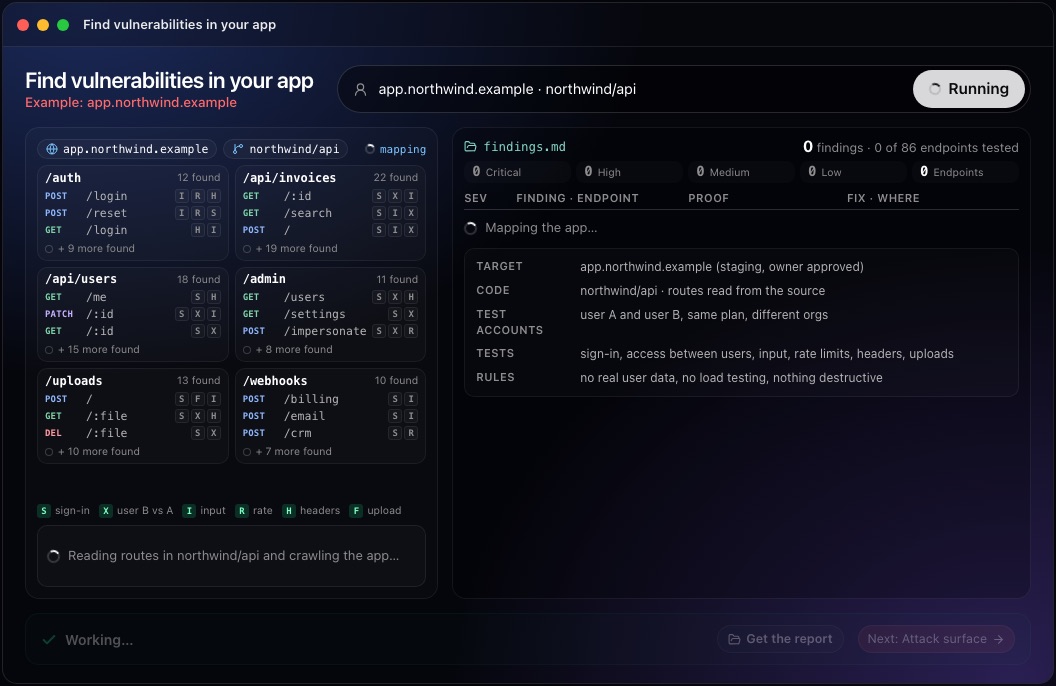
This step in the 10folds window. Example data from the animation on the home page. Test every endpoint for the common flaws
Test what the app allows, then test what it should refuse.
What to do
- Authentication testing: sign-in rate limits, password reset links that expire, session cookies and tokens.
- Broken access control: replay each request from user A as user B, and as a regular member on admin routes.
- Input handling: injection, unescaped output (cross-site scripting), file uploads, requests the server makes on your behalf.
- Configuration: security headers, error messages that reveal internals, webhooks that accept unsigned events.
- Check business logic flaws by hand: steps that can be skipped, prices or quantities that can be changed.
Why
The OWASP Top 10 lists the categories most often exploited, with broken access control in first place. A vulnerability scanner helps with headers and known patterns, but access between users and business logic need someone who understands what the app is for. Work through the endpoint list in order and mark each endpoint as tested, so the report can say exactly what was covered.
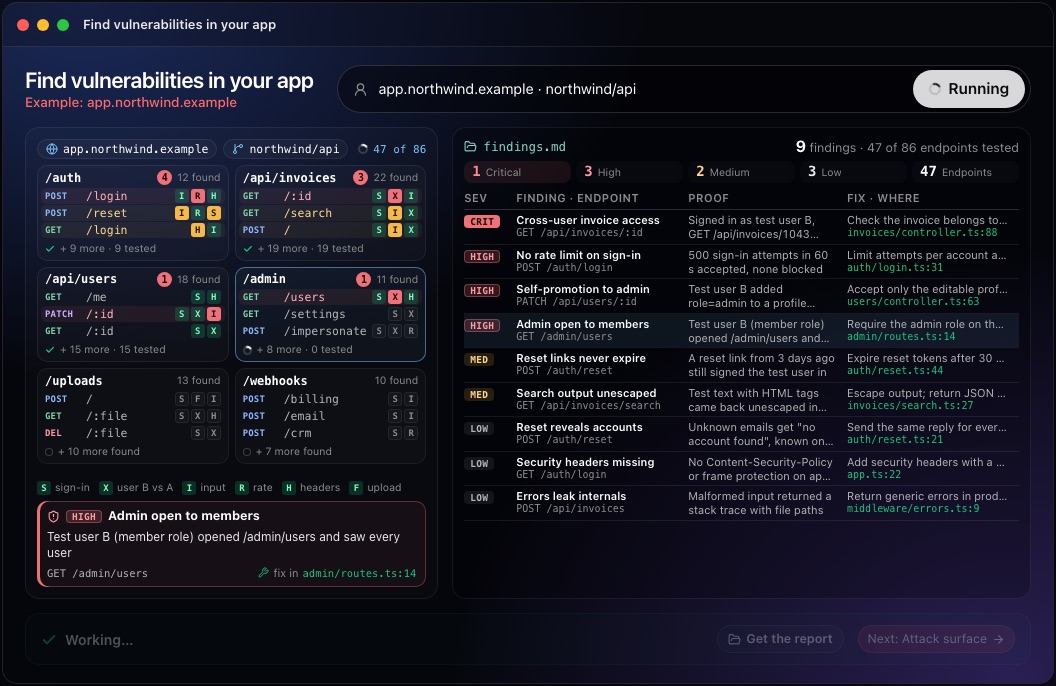
This step in the 10folds window. Example data from the animation on the home page. Prove each finding
If you cannot reproduce it, do not report it.
What to do
- Reproduce every suspected flaw with a minimal request and save the response.
- Show impact with test data only: user B saw user A's test invoice, never a real customer's.
- Rate severity by impact and by how easy the flaw is to use.
- Drop anything you cannot reproduce, or label it clearly as unconfirmed.
- Write down the exact steps, accounts and data used, so the finding can be replayed after the fix.
Why
A proof of concept ends the debate about whether a finding is real and makes the fix testable. Unconfirmed warnings waste developer time and erode trust in the whole report. Keep each proof short enough that a developer can replay it in a minute. Severity should reflect your app: an access flaw on invoices is worse than one on a public page.
Write the fix and retest
A finding is closed when the same request fails.
What to do
- For each finding, describe the fix in plain terms and point to the file and line where it belongs.
- Look for the root cause. One missing ownership check often appears on many routes.
- Order the list with critical and high findings first.
- After the fix, replay the proof request and confirm the app refuses it.
Why
Developers fix faster when they know where to look. Replaying the same request is the only evidence that a fix works. Fixing the root cause once, in shared code such as middleware, also protects the routes added later.
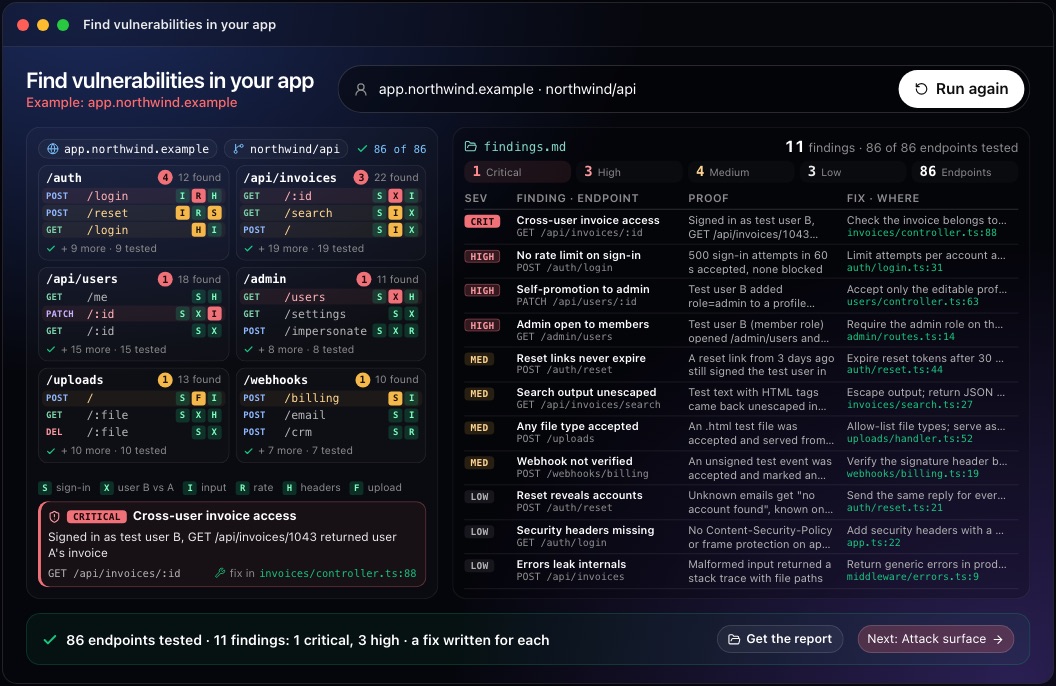
This step in the 10folds window. Example data from the animation on the home page.
Common mistakes
- Testing without permissionEven well-meant testing of a system you do not own can be illegal.
- Trusting the scanner reportScanners miss access control and logic flaws and report many false positives.
- Using one test accountWithout a second account you cannot see one customer reading another's data.
- Testing on production dataA test that changes or exposes real records becomes an incident.
- Reporting without proofA finding nobody can reproduce gets closed as not a bug.
What a good result looks like
- A written scope: target, accounts, rules and who authorized the test.
- The full endpoint list, with which endpoints were tested.
- Each finding: endpoint, proof request and response, severity, fix and file.
- Findings ordered by severity, with the root cause named where several share one.
- A list of what was not tested, and why.
And then what? Using the result
- Fix critical and high findings first, then replay each proof request.
- Add a test to your suite for each fixed flaw so it cannot come back.
- Share the root causes with the team, such as a missing shared ownership check.
- Test again after major releases or features that add endpoints.
- Keep the report for customer security reviews.
When to run it
- Before a launch or a large releaseNew endpoints bring new flaws. Testing before release costs less than a fix after. Focus on the new routes and on anything that changed how users are kept apart.
- When a customer asks for a security testA dated report with proven findings and fixes answers the question.
- After adding roles or multi-tenant featuresAccess rules change, and old checks may not cover the new routes. Test every role against every new route.
- When the app has never been testedA first test sets a baseline and usually finds the most important gaps.
Questions people ask
How do you test a web application for vulnerabilities?
Get written permission, map every endpoint from the code and the running app, test each one for authentication, access control, input and configuration flaws, prove each finding and write the fix. Use a staging copy and test accounts. Write down what was tested so the next round can start from it.
What is the OWASP Web Security Testing Guide?
It is a free, open reference from the OWASP Foundation that lists what to test in a web application and how. Testers use it as a checklist alongside the OWASP Top 10. It is organized by area, such as information gathering, configuration, authentication and session management.
Can automated scanners find all vulnerabilities?
No. A vulnerability scanner finds missing headers and known patterns, but it cannot tell whether user B should see user A's data or whether a checkout step can be skipped. Those need a tester who reasons about the app. Use a scanner for coverage and a person for judgement.
What is broken access control?
It is when an app lets a user see or do something they should not, such as reading another customer's records by changing an ID in the address. It is the first category in the OWASP Top 10. The fix is a server-side check on every request that the user owns or may access the record.
Can I do web application vulnerability testing on any website?
Only sites and apps you own or have written permission to test. Testing other people's systems without permission can break the law.
What should a vulnerability test report include?
The written scope, the endpoints tested, and for each finding the proof request and response, the severity, the fix and the file to change. Add what was not tested and why. The 10folds report is meant as a draft for the developer or security lead who decides on the fixes.
More jobs in Cybersecurity
Find vulnerabilities in your app, on your own Mac.Free app. Runs on your Mac with the Claude or Codex plan you already have. Your files stay on your computer.
Download for Mac