
SaaS audit: how to find the software subscriptions you can cut
A SaaS audit step by step: list every subscription from card and bank payments, check seats against real use, remove duplicates and time renewals.
Free app. Runs on your Mac with the Claude or Codex plan you already have.
What a SaaS audit is
A SaaS audit is a review of every software subscription a business pays for: what it costs, who uses it, and whether it is still needed. It ends in a short list of changes, each with its saving: seats to remove, tools to merge, plans to change and subscriptions to cancel. Done well, it turns a list nobody owned into a register with an owner, a cost and a renewal date for every tool.
Software is bought one card payment at a time, often by different teams, so most companies pay for more subscriptions than anyone has listed. This build-up is called SaaS sprawl, and tools bought without finance or IT knowing are called shadow IT. The method below is how a finance or operations lead audits software spend by hand. Each step says what to do and why, then how 10folds carries it out. Card statements are the best starting point, because every paid tool leaves a trace there even when nobody remembers buying it.
What it does for the business
- Cut costs without cutting workMost savings come from seats nobody uses, tools that do the same job and forgotten trials. Removing them changes nothing for the people doing the work. They are also the fastest savings to make, since most can be done from the tool's admin page.
- Know what you pay forA complete software inventory with owner, cost and renewal date replaces guesswork. Finance can plan, and IT can see which tools hold company data. It also shows how much each team spends on software, which helps when budgets are set.
- Close access for people who leftSeats still assigned to former staff cost money and leave accounts open. Finding them is a security fix as well as a saving. Removing them also tidies who can see company files and customer data.
- Negotiate from evidenceKnowing how many seats are used and how the price has moved gives you a clear position at renewal, whether you reduce, switch to annual billing or leave. Vendors expect customers to ask, and a clear count of active users is the strongest argument.
SaaS audit, step by step
Build the inventory from payments
If it is paid every month, it belongs on the list, whoever bought it.
What to do
- Export 12 months of payments from every company card and bank account.
- Find the charges that repeat: same payee, similar amount, every month or every year.
- Group them by vendor and record the plan, billing cycle, cost per year and the card it is on.
- Add subscriptions paid by invoice or bought by individuals and expensed.
- Name an owner for each one.
Why
Asking teams what they use misses the tools nobody remembers, and those are exactly the ones worth cancelling. Twelve months of payments catches annual renewals that a three-month view would miss. Bank and card descriptions are often cryptic, such as a payment processor's name instead of the vendor, so expect to look some of them up.
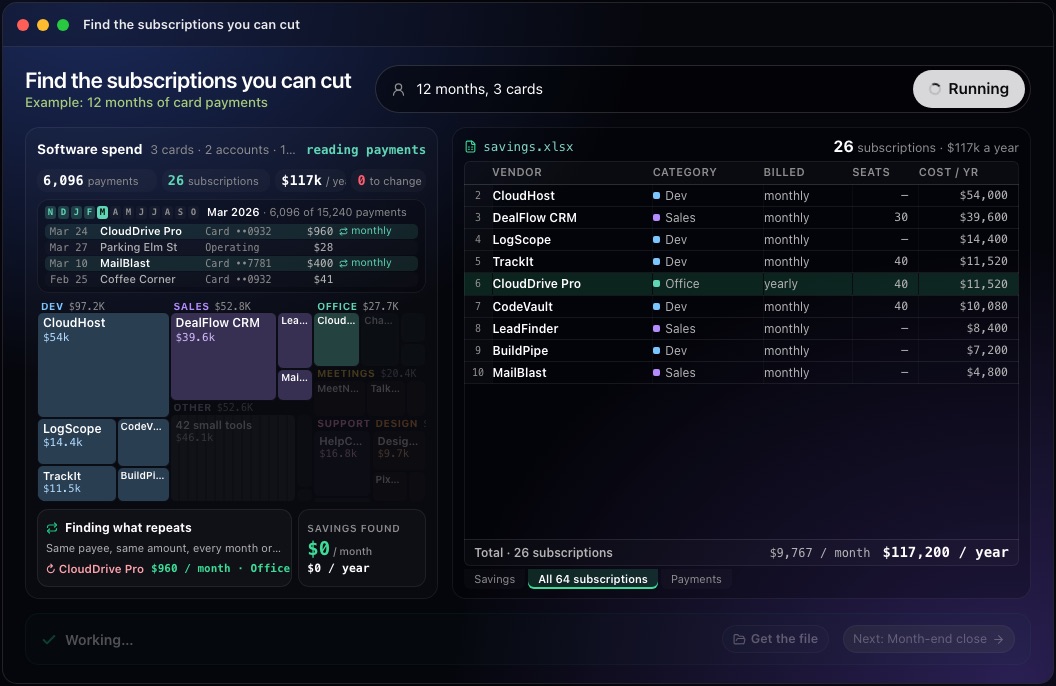
This step in the 10folds window. Example data from the animation on the home page. Check seats against real use
A seat nobody logs into is a monthly donation.
What to do
- For each tool billed per seat, compare seats paid with active users over the last two or three months, from the tool's admin page.
- List seats still assigned to people who have left the company.
- Check the plan tier: an expensive plan is often bought for one feature nobody uses.
- Propose a seat count with a little room for planned hires.
Why
Seats are added when people join and rarely removed when they leave or stop using the tool. License rightsizing, matching paid seats to real use, removes unused licenses without taking a tool away from anyone who needs it. Start with the most expensive per-seat tools, where each removed seat saves the most. Some tools count a seat as active when someone merely accepted an invitation, so look at real activity such as logins or edits.
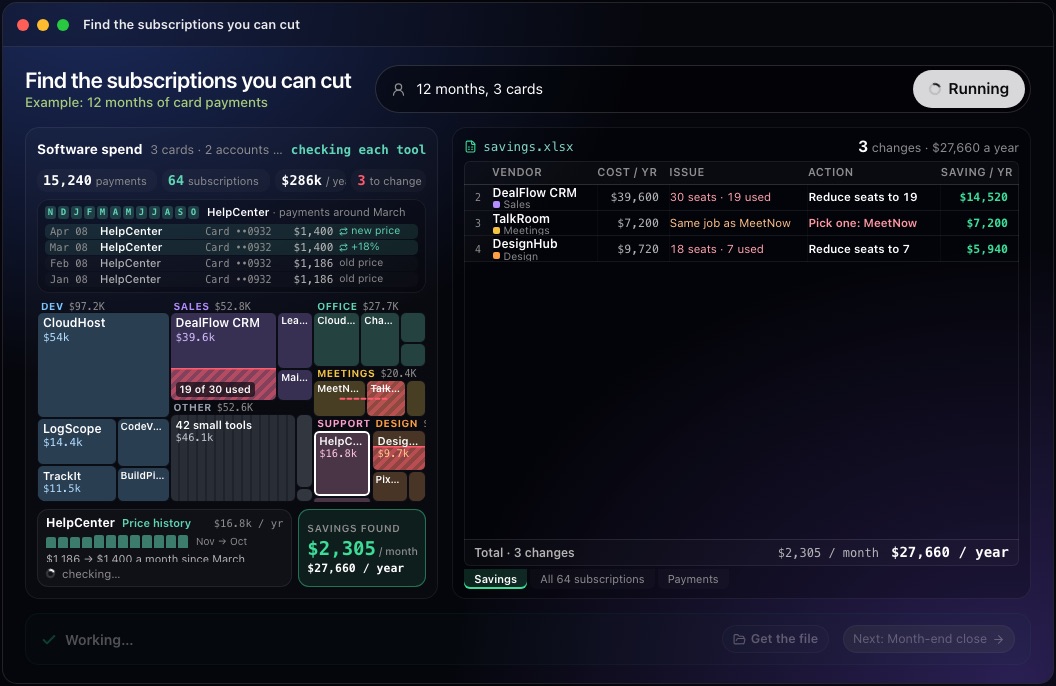
This step in the 10folds window. Example data from the animation on the home page. Remove duplicate tools
Two tools for one job means paying twice and keeping work in two places.
What to do
- Group subscriptions by what they do: video calls, file storage, design, project tracking.
- Where two or more tools do the same job, find which one more people use.
- Check what would have to move: files, history, integrations.
- Pick one, with a date to switch and a person responsible.
Why
Duplicate tools appear when teams buy separately. Merging them saves the full cost of the tool you drop and can earn a better price on the one you keep. Before you choose, ask the heaviest users of each tool what they would lose; the cheaper tool is not always the one to keep.
Check prices and renewal dates
A price rise nobody notices becomes the new price.
What to do
- Compare each subscription's price today with twelve months ago and flag every rise.
- Note the renewal date and the notice period of each annual contract.
- Check whether annual billing is cheaper for tools you are sure to keep.
- Find trials that turned into paid plans without anyone deciding.
Why
Vendors raise prices at renewal, and most contracts renew automatically. A list of renewal dates gives you time to negotiate or cancel inside the notice period. Many annual contracts require written notice before the renewal date, so the date to act comes earlier than the date on the invoice. Annual billing saves money only on tools you are sure to keep for the whole year.
Decide, act and keep the list current
An audit saves money only when someone cancels something.
What to do
- Rank the changes by saving and by how easy they are to make.
- Confirm each change with the tool's owner before cancelling.
- Make the changes before the next billing date and check the next statement.
- Agree a simple rule for new subscriptions, such as one named approver.
- Repeat the audit every six to twelve months.
Why
Owners know things the payments cannot show, such as a tool needed for one client each quarter. Checking the next statement confirms the saving was real, and a purchase rule stops sprawl from coming back. Keep the inventory as a living list, updated when a tool is added or cancelled, so the next audit starts from it. The purchase rule can be light: a message to one person before buying is enough to keep the list complete.
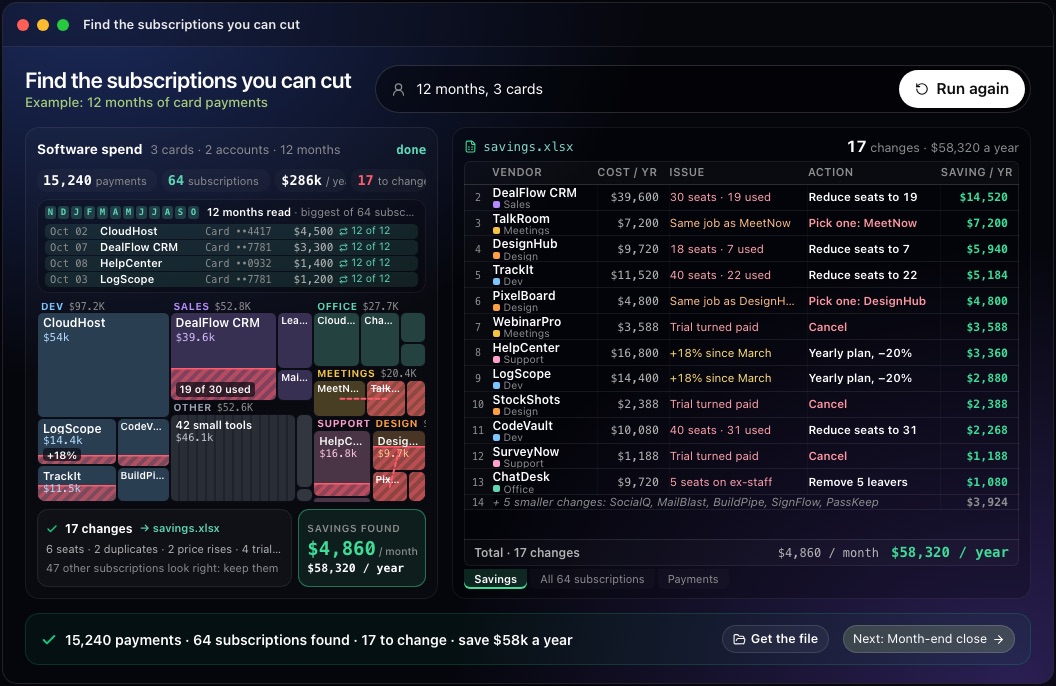
This step in the 10folds window. Example data from the animation on the home page.
Common mistakes
- Asking teams instead of reading paymentsPeople forget the tools they bought and stopped using.
- Cancelling without asking the ownerA tool that looks unused may be needed once a quarter.
- Missing annual renewalsA three-month view skips subscriptions billed once a year.
- Removing every spare seatLeave room for planned hires, or you will buy seats back at a worse price.
- Doing it onceNew subscriptions appear every month, and without a purchase rule the sprawl returns.
What a good result looks like
- Every subscription with vendor, owner, cost per year, billing cycle and renewal date.
- Each proposed change with its reason: unused seats, duplicate, price rise or unwanted trial.
- The saving for each change, per month and per year.
- Changes ranked by saving and ease.
- The subscriptions that look right, marked as checked, so nobody reviews them twice.
And then what? Using the result
- Confirm the largest changes with each tool's owner this week.
- Remove unused seats and leavers' accounts before the next billing date.
- Put renewal dates and notice periods in a shared calendar.
- Check next month's statements to confirm the savings arrived.
- Name one approver for new software purchases.
When to run it
- Before budgetingThe inventory shows what software really costs per year, so the budget starts from fact. It also shows which renewals fall in the coming year, so they can be planned.
- When costs need to come downSoftware savings rarely change how work is done, so they are a sensible first place to look. Start with the changes that need only an admin's click.
- After people leave or a team shrinksSeats follow headcount up and rarely follow it down. An audit brings them back in line. Run it a month or two after the change, once access for leavers should have been removed.
- Before a large renewalKnowing real usage before the notice period ends gives you room to negotiate or to leave. Start early enough to test an alternative if you plan to switch.
Questions people ask
How do you do a SaaS audit?
Export 12 months of card and bank payments, find every recurring software charge, and check each one for unused seats, duplicates and price rises. Confirm the changes with each owner and make them before the next renewal. Card statements and admin access to your main tools are all you need for a first pass.
How can a company reduce SaaS costs?
Remove unused licenses and leavers' seats, merge duplicate tools, move tools you will keep to annual billing where it is cheaper, and negotiate or cancel before renewal dates. Start with the largest per-seat tools, where each change saves the most.
How often should you audit software subscriptions?
A full audit once or twice a year suits most small companies, with a quick check before each large renewal. Companies that buy software often may need to look more frequently. Keeping the inventory up to date between audits makes each one faster.
What is SaaS sprawl?
SaaS sprawl is the build-up of subscriptions bought by different people over time, leaving overlapping tools, unused seats and nobody holding the full list. It happens in most growing companies because buying software is easy and cancelling it is nobody's job.
What is shadow IT?
Shadow IT is software that teams buy or sign up for without going through finance or IT, often on a personal or team card. It is why an audit starts from card and bank payments: those show tools that no official list contains.
Does it cancel subscriptions for me?
No. It finds the savings and shows what each change is worth. You decide, and you make the changes yourself. Confirming each change with the tool's owner first avoids cancelling something a team still needs.
More jobs in Finance
Find the subscriptions you can cut, on your own Mac.Free app. Runs on your Mac with the Claude or Codex plan you already have. Your files stay on your computer.
Download for Mac