
Website crawling: how to save every page of a site as clean text
Website crawling done properly: set the scope, find every page, fetch politely, save clean Markdown with its source URL and report what was missed.
Free app. Runs on your Mac with the Claude or Codex plan you already have.
What website crawling is
Website crawling is the work of visiting every page of a site by following its links, then saving what each page says. A web crawler starts from one address, reads the page, collects the links that stay on the same site and repeats until nothing new is left. Teams crawl a site to feed its text to an AI assistant, to prepare a migration, to audit content or to keep an archive.
The method below is how an experienced technical SEO or documentation engineer does it by hand. Each step says what to do and why, then how 10folds carries it out.
What it does for the business
- Give an AI assistant the whole siteClean text for every page lets an assistant answer from your real documentation or content, with a link back to the page each answer came from.
- Migrate without losing pagesA complete list of pages and their text is the inventory a migration needs. Nothing gets left behind because nobody knew it existed.
- Audit content in one placeWith every page saved as text, you can search the whole site for outdated product names, duplicate pages, thin pages and broken links in minutes.
- Keep a record of what the site saidA dated copy of every page shows what was published at a given moment, which helps with compliance questions, disputes and before-and-after comparisons.
Website crawling, step by step
Set the scope and the purpose
Every crawl needs a fence, or it becomes a crawl of the internet.
What to do
- Name the starting address and the host you will stay on, for example docs.example.com.
- List the sections to include and the ones to skip, such as search pages, tag archives and login areas.
- Decide the output: one Markdown file per page is easiest to read, search and feed to other tools.
- If the site is not yours, check its terms of use and decide whether you need permission.
- Set a page cap for the first run.
Why
Links lead everywhere: to other domains, to endless calendar pages, to filtered views of the same product list. A clear fence keeps the crawl finite. The purpose decides what counts as a page worth saving. An AI assistant needs the text, a migration also needs every address, and an audit needs the broken pages too.
Find every page
The sitemap is what the site says it has. The links are what it really has.
What to do
- Read sitemap.xml first. It lists the pages the owner wants found.
- Follow internal links from the start page, level by level, and record the crawl depth of each page.
- Normalize addresses: one form for trailing slashes, upper and lower case, and tracking parameters.
- Respect the canonical URL a page declares, so duplicates are saved once.
- Note pages in the sitemap that no link reaches, and pages linked but missing from the sitemap.
Why
Sitemaps are often out of date, and link following alone misses orphan pages that nothing links to. Using both gives the fullest list. Crawl depth is the number of clicks from the start page; pages that sit very deep are often forgotten content worth knowing about. Without normalizing addresses, the same page is saved five times under five spellings.
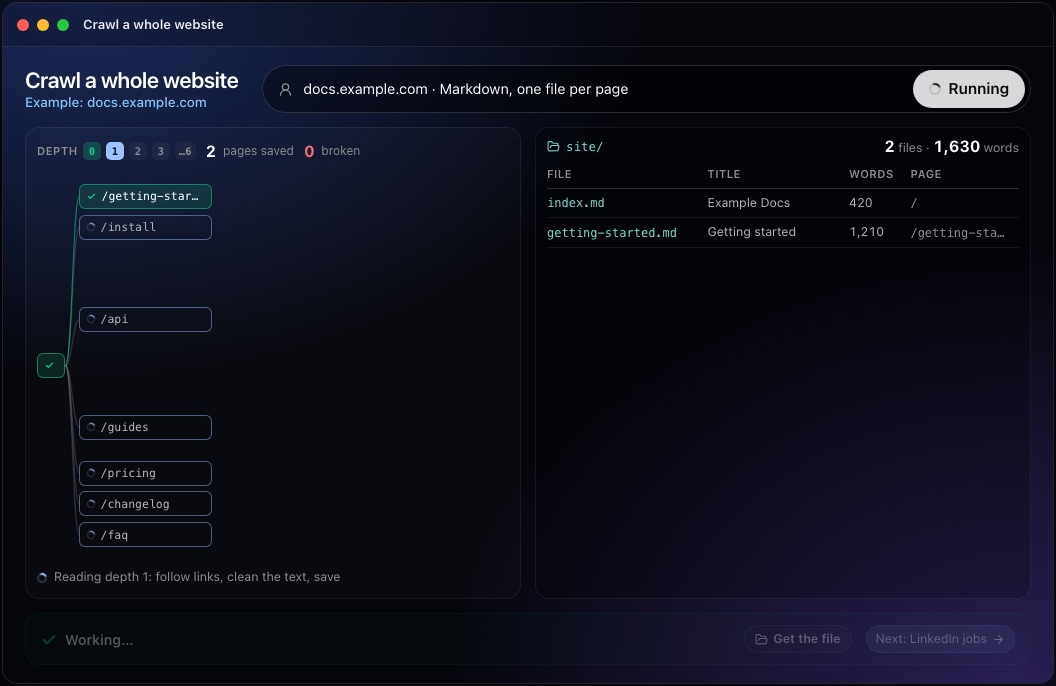
This step in the 10folds window. Example data from the animation on the home page. Fetch politely
Crawl as if the site's owner were watching the server logs.
What to do
- Read robots.txt and obey its rules, including any crawl delay.
- Send an honest user agent that says who is crawling.
- Keep a low rate limit, such as one request every second or two, and slow down if responses get slower.
- Stop on repeated errors, and never try to get past logins or challenges.
- Render JavaScript only for pages whose text does not appear without it.
Why
A crawler that sends requests too fast can slow a small site for its real visitors, and site owners block crawlers that behave badly. robots.txt is the owner's statement of what automated visitors may read. Rendering every page in a browser is slow and heavy, so use it only where the plain page is empty. A polite crawl of a large site takes longer, and that time is the price of being allowed back next month.
Save clean text, one file per page
Keep what the page says, and drop what every page repeats.
What to do
- Extract the main content and remove menus, footers, cookie banners and sidebars.
- Keep the structure: headings, lists, tables, code blocks and links.
- Convert to Markdown, a plain-text format that keeps headings and lists readable.
- Put the source URL, page title and crawl date at the top of each file.
- Name files after their address, so anyone can find the page from the file.
Why
Navigation repeated on every page buries the real content and confuses search and AI tools, which then return the menu instead of the answer. Headings and tables carry meaning that plain text loses. The source URL on each file lets anyone check a passage against the live page and lets an assistant cite where an answer came from. The crawl date matters too: pages change, and a file without a date cannot tell you whether it still matches the site.
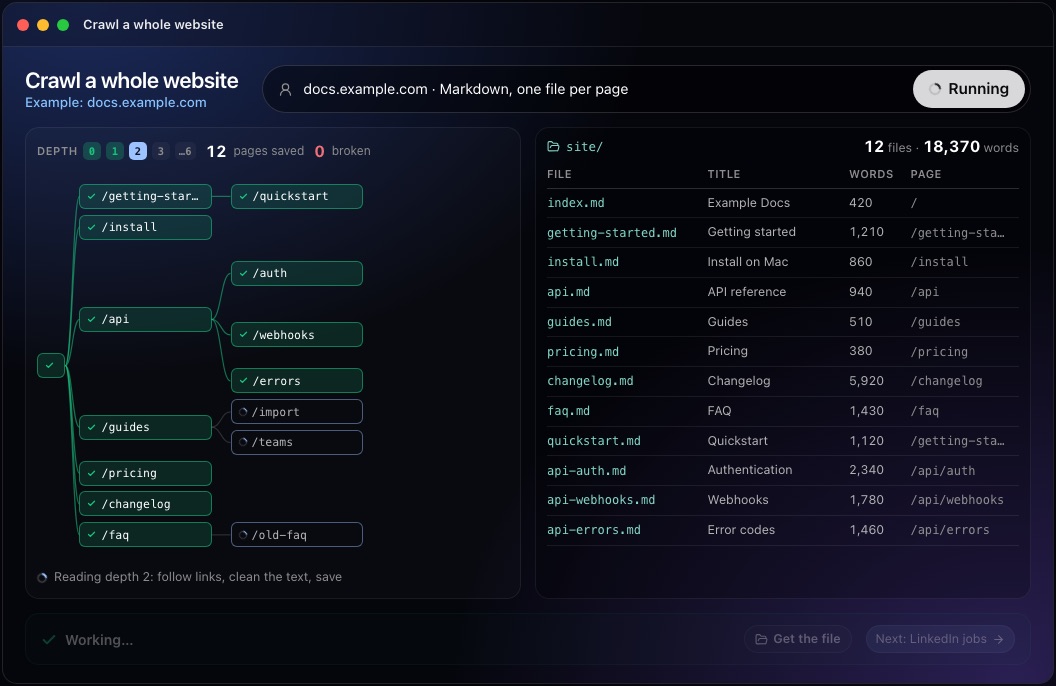
This step in the 10folds window. Example data from the animation on the home page. Check coverage and report the gaps
A crawl report is as useful for what it missed as for what it saved.
What to do
- Compare the number of saved pages with the sitemap and with the links found.
- List broken links and pages that returned errors, with the page that linked to them.
- Open a sample of files and compare them with the live pages.
- Flag empty or near-empty files: they often mean the page needs JavaScript or blocked the crawler.
- Write a short report: pages saved, pages skipped by rule, pages failed and why.
Why
Crawls fail silently: a page that loads its text by script saves as an empty shell, and a blocked section simply disappears. A coverage check catches both. Broken links found along the way are a bonus for the site owner, because each one is a dead end for visitors and search engines. The short report tells whoever uses the files whether they hold the whole site or a known part of it, which matters a great deal when an AI assistant will answer questions from them.
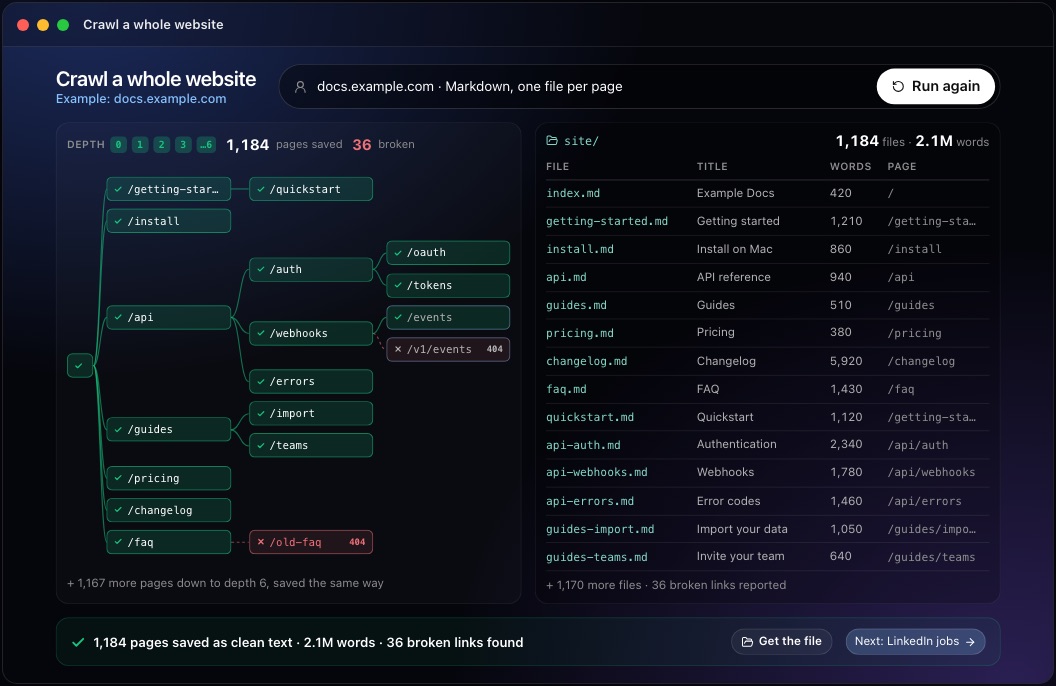
This step in the 10folds window. Example data from the animation on the home page.
Common mistakes
- Crawling without a fenceCalendars, filters and search pages can generate endless addresses.
- Ignoring robots.txtIt states what the owner allows, and ignoring it gets crawlers blocked.
- Saving menus and footers with every pageThe repeated text drowns the content.
- Dropping the source URLWithout it, no passage can be checked, cited or traced back to its page.
- Assuming the crawl got everythingCompare with the sitemap and list what is missing.
What a good result looks like
- One Markdown file per page, named after its address.
- Source URL, title and crawl date at the top of each file.
- Main content only, with headings, lists, tables and code intact.
- A list of broken links and failed pages.
- A count of saved pages compared with the sitemap.
And then what? Using the result
- Load the files into your AI assistant or search tool, keeping the source URLs.
- Use the page list as the inventory for a migration and its redirects.
- Fix the broken links the crawl found.
- Search the text for outdated names, prices or claims.
- Crawl again after major changes and compare the two copies.
When to run it
- Setting up an AI assistant on your docsThe assistant needs clean, current text with source links, and a crawl provides it.
- Before a site migration or redesignA full inventory of pages and their text stops content from being lost in the move.
- During a content auditEvery page in one folder makes duplicates, thin pages and outdated text easy to find.
- To keep a dated archiveA copy of the site at a point in time answers later questions about what was published.
Questions people ask
How do you crawl an entire website?
Start from the home page and the sitemap, follow every link that stays on the same host, record each new page once and stop when no new pages appear. Obey robots.txt, keep a slow rate and save each page's text with its source URL.
Is it legal to crawl a website?
Crawling public pages is common, but the site's terms of use, copyright and data protection law all apply, and the rules differ by country. Crawling your own site is simple. For other sites, respect robots.txt, avoid personal data and get advice before reusing the content.
How do you convert a website to Markdown?
Crawl the pages, extract the main content of each one, then convert its HTML to Markdown so headings, lists, tables and links survive. Save one file per page with the source URL at the top.
How do you crawl a website without overloading it?
Send one request at a time with a pause between them, follow any crawl delay in robots.txt, slow down when the server slows, and crawl outside the site's busy hours where you can.
What is the difference between website crawling and scraping?
Crawling finds and visits pages by following links. Scraping extracts specific fields from pages, such as prices or names. A full-site text export does both: it crawls to find every page and extracts the main text of each.
How often should you re-crawl a website?
Whenever the copy needs to match the live site: before a migration, after a large content update, or on a regular schedule if an AI assistant answers from the files. Keep the date of each crawl with its files, so everyone knows how current they are.
More jobs in Scraping
Crawl a whole website, on your own Mac.Free app. Runs on your Mac with the Claude or Codex plan you already have. Your files stay on your computer.
Download for Mac